Should You Outsource Document Scanning or Do It In-House?

So you’ve decided that you want to make your business or organization paperless, or at least want to scan a ton of backfile documents. There are so many great reasons to take your documents digital and the time you’ll get back from automating processes is more than worth the upfront conversion cost.

But now the decision you have to make is if you want to scan all of your backfiles yourself or if you want to have a third-party company do the scanning for you. There are benefits to both ways, which we’re going to cover below.

First, let’s go over outsourced document scanning.

Benefits for Outsourcing Your Document Scanning

1. High Speed Production Scanning Equipment
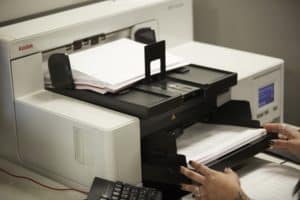
document scanning company equipment
A third-party company will already have the equipment for a scanning project.

As a document scanning company’s business is document scanning, they already (or should) have top-of-the-line high speed production scanning equipment. These scanners can process hundreds of pages per minute, which is much fast than the typical desktop scanner.

2. Staff Experienced in Scanning Services

Along with already having equipment, third party scanning companies also already have trained and experienced staff to handle the preparation, scanning, and indexing of your documents. Scanning can start immediately and end faster than if you have to decide on a process and train your own employees.

3. No Need to Buy/Rent Your Own Scanners

As the company already has their own, you will not need to spend hundreds (or even thousands!) of dollars on your own scanning hardware and software.

4. Adequate Space to Process Your Records

A scanning company’s entire office is arranged for how to best prep and scan your documents. You won’t need to find a space in your own office for the scanning.

5. Knowledge of Process and Standards

document scanning company staff office
Document scanning companies are designed specifically for scanning projects and have highly-trained staff.

Not only do they know the best way to convert your documents, they’re going to do it at the highest level of output quality. A scanning company can also advise the best output and storage for your particular needs.

6. Known Costs

When you outsource to a document scanning company, they should provide you with an itemized bill before you sign the contract. This means that you will know exactly how much the project will cost and there won’t be any surprise fees or expenses. Often, organizations that opt to scan themselves don’t realize how much labor time and costs will go into the project.

7. Reduced Down-Time with More Deployable Equipment

You won’t lose any time on your project if equipment breaks or goes down. Companies plan for this in their day-to-day operations and should have contingency plans and backup equipment to keep everything running business as usual.

8. Turnkey Document Management Solutions

If you aren’t entirely sure what you want to do with your new digital files, a document scanning company will have the expertise to recommend (and if you want, setup) a new document management solution for you. A good company will take the time to listen to your organization’s goals and then recommend the right solution from a variety of choices.

Now let’s cover the benefits of keeping your scanning project in-house.

Benefits for In-House/On-Premises Document Scanning

1. Greater Project Control

When you’re in charge of scanning your own documents, you can completely control everything within the scanning project. You can pick your own software, hardware, employees, location—everything! If you decide you need to change something or reprioritize documents, it’s an easy correction to make.

2. Knowledge of Your Organization’s Objectives

shred unneeded documents
You and your company will know best which documents can immediately be destroyed.

Doing the scanning in-house means that you can control input and output according to your organization’s objectives. You will know better than any vendor what’s critical to your company’s success and you can translate that into your scanning project.

3. Ability to Reduce Unnecessary Material

Since you’ll be preparing your own files, you can take a look at the documents and determine if they even need to be scanned. It’s very possible that 40-60% of your documents are older than your retention policy and simply need to be destroyed.

Pro tip: if you don’t have a retention schedule/policy, you really should put one on paper before starting a scanning project. You don’t want to destroy something you may need and you don’t want to scan an unnecessary amount of paper.

4. Possible Lower Cost

Depending on the amount of documents you need to scan, it’s possible that doing it in-house will have a lower price point than outsourcing. That comes from you knowing the documents better than any company, so you would know what may not need to be scanned.

However, be aware of hidden costs. There are a lot of factors to consider (employee time, transportation costs, hardware) so it’s important you get accurate quotes for both scenarios. Remember that any time your employees spend preparing and scanning documents will be lost from other work.

Ultimately, it comes down to your business’ priorities, budget, timeline, and preference as to which scanning method you pick. And no matter which choice you make, the entire process must be closely- and well-managed with multiple points of quality control built in. This will ensure that your final images are readable and usable. Saving money may not be worth it if you end up with poor quality files that you can’t use.

If you have any questions about either choice, you can always contact us or give us a call at (630) 321-0601. We’re happy to support any scanning project that you have in mind!

This post is part of the Datamation Guide to Document Scanning.

4492

publish

2019-07-31 06:00:58

outsource-document-scanning-vs-in-house

Datamation Document Scanning Process: A Complete Overview

Have you thought about scanning and storing your business documents digitally, but you’re not sure exactly how it works? At Datamation, we believe that an educated customer is an empowered customer. That’s why we have a clear, easy-to-understand document scanning process.

Take a look at the video below to get a feel for our process. Or, if you rather read about it, skip to the text after.

Step 1 – Boxing/Pickup

A Datamation employee will come in a company vehicle and load your boxed documents directly into the truck. This is a low-contact pickup as we only need a signature for release. What makes Datamation unique is that your personal records and documents are never handled by a third party–Datamation is fully responsible for the security of your documents. Once the drive starts, the company vehicle doesn’t make a single stop along the way. Everything goes directly to our secure facilities.

Step 2 – Receiving

After your documents have made it safely to our facilities, we work hard to ensure that you always know exactly where they are.

During Receiving, all of your boxes are assigned a unique bar code that allows us to track the progress of the job and the location of your boxes. It allows you to always know where your files are so you can be assured that they are all in one place. If you still need access to these files during scanning, that’s no problem! The files are available to you at any time and can be found in a matter of seconds.

Step 3 – Document Assessment and Preparation

Document assessment and preparation is the most important part of the scanning process. In terms of preparation, your documents are carefully readied for the scanner with any work they need before being scanned to ensure clean, legible digitization.

Low preparation documents usually just have a few staples or paper clips that need to be removed. Medium preparation documents may have more staples, and perhaps some other minor damages. High preparation documents contain many staples, dog-eared pages, and tears that require taping. We can even scan older documents that may need more careful handling. No matter the amount of care needed to repair documents, we will make sure that each document is as clear and unblemished as it was when it was first printed.

As this process is completed, we will also be looking through your files to see what can be purged to save you time and money.

Step 4 – Scanning/Capture

As an official partner of Kodak, we guarantee that every file is scanned on a top-notch Kodak production scanner one page at a time by a living, breathing person.

With these Kodak scanners, there is virtually no need for re-scans, as their exclusive Perfect Page technology makes sure that every color is perfect and text is crisp and clear.

Blank pages are automatically deleted, ultra-sonic double detection ensures that no pages are accidentally skipped, and the quality of the document itself is constantly monitored, assuring the best results. You can have your files scanned front and back, in color or grayscale, or even in different resolutions. Every detail is accounted for.

Step 5 – Indexing

Indexing allows you to find information within your documents with an easy keyword search, much like a Google search.

Depending on your specific documents and needs, our team can index via hand-keying, bar code application, zonal OCR (Optical Character Recognition), or full page OCR. Zonal OCR allows you to find specific text within a certain zone of the page, while full-page OCR allows you to find specific text within a full page of text.

Step 6 – Quality Review

After all documents are scanned, our Quality Review focuses on three key points:

  1. Did we scan every file?
  2. Are the images clear and readable?
  3. Is the indexing accurate and complete?

The same living, breathing people who scan your documents perform these manual record integrity checks to make sure that each file in the file box has a digital match. Once this is done, your hard copies can either be shredded or returned back to your company, depending on state and company regulation.

Step 7 – Output/Finishing

Our final step is to configure the scanned documents in whatever ECM system you would like, from the cloud-based system ImageSilo to Laserfiche, OnBase, IBM, or any other format you prefer for integrated storage and distribution.

With a cloud-based system, you have access to any document in any location with internet access, and your files are protected from natural disasters and hacking. Each file is backed up and protected by encryption codes that keep your files safer than ever.

Your documents can also be archived in a folder in PDF format. If you want to take a hybrid approach, we’ll keep your paper documents in our storage facilities while you maintain the digital copies—it’s all up to you!

Pretty simple, right? We try to make the process as pain free for your business as possible. Your documents will never be as secure or organized as they are when you have them scanned with Datamation. If you’re ready to try it out for yourself, contact us today to start your free trial.

If you have any other questions about our document scanning process, or want to start a scanning project, call us at (630) 321-0601 or contact us.

This post is part of the Datamation Guide to Document Scanning.

1679

publish

2019-03-04 00:00:00

datamation-document-scanning-process-a-complete-overview

Why Manual Data Entry Causes Problems (and What You Can Do!)

No matter the situation, no matter the employee, no matter the time, any situation that involves manual data entry is going to be subject to error. And it’s not necessarily someone’s fault—there are lots of things that can happen to make your data entry just a little less than perfect.

Here are some of the problems that can be caused with manual data entry:

1. Human Error

The first on our list is perhaps the most obvious. No matter how great of an employee you have, there will be mistakes—it happens to everyone. People can have an off day, they may have their fingers on the wrong keys, or they could have a workplace distraction. Now multiply that by however many people you have doing data entry.

2. Expense

Not only do you have the expense of an employee’s salary, but also their workstation, computer, and any time taken to train them. On top of that, if the training is inadequate, employees will not perform at their best.

With any manual task, data entry by hand takes up a lot of time. Employees have to look at the file or record to enter, enter the data, and then double check their work. While these aren’t many steps, this does take a lot of time to perform and just as much to check.

Worst case scenario, these errors can cost your organization millions.

3. Missing Items

With manual data entry, the employee usually will be handling paper invoices, bills, and other important documents. With the documents being delivered, sorted, used, and filed, it’s not uncommon for something to go missing. If the wrong file goes missing, it can lead to financial penalties and strained relationships with clients and suppliers. It can also lead to our next problem.

4. Inaccurate Data

When data is entered incorrectly, it can lead to all sorts of problems. You may have wrong account numbers, prices, or information. And if you rely on this kind of information to make big decisions, you could be making the wrong ones.

data entry problems

So what can you do about it?

If you want to stick with manual data entry, make sure that you invest the time in proper training and build in some quality control checks to ensure that your employees are giving the best output.

But another choice, especially when it comes to accounts payable, is to invest in an automated AP system. An automated AP system not only cuts down on expenses and human error, but you can also:

  • Use AP processing data to forecast cash flow
  • Form better cash management plans
  • Increase visibility into invoice processing
  • Build up relationships with suppliers

When it comes to suppliers, you can even incorporate a portal for them. This gives them the ability to get a better idea of where they stand with payment, deliveries, and other information. Also having that open line of communication between suppliers and other departments makes almost every process and function much smoother and less prone to error.

Finally, sometimes suppliers give businesses an early payment discount. With your system streamlined and costs cut back, you can take advantage of these savings which will save your business even more!

Interested in learning more about what automated AP can do for your business? Contact Datamation or give us a call at (630) 321-0601 today.

This post is part of the comprehensive Datamation Guide to AP Automation.

1676

publish

2019-02-12 00:00:00

why-manual-data-entry-causes-problems

Get a No Risk, Free Sample Scan of Your Records from Datamation

When it comes to your organization’s information, we understand that you want to make the right choice for digitizing your records. Not only do you want to make sure that the company you’re working with knows what they’re doing, but you also want to make sure that after the scanning process, your data is easy to read, access, and use.

That’s why Datamation is happy to give you and your business a free sample scanning of your records with a no risk, test drive of our services!

Let us digitize a sample of your paper, microfiche, or blueprints and drawings. Then we’ll upload them to a secure version of the industry-leading document management software, send you a link and login so you can look over your files, and host them at no charge for up to 30 days. It’s a no risk way to get a real feel for the power of imaging.

Here are the benefits of this free sample:

  • Observe the final product of your scanning without any cost
  • Get hands on experience with how to search your scanned documents
  • Navigate through the leading document management system (again, without any cost)
  • Test your end product to eliminate any risks and unknowns

And best of all? If you are within the Chicagoland area, we’ll come pick up the sample at no charge.

Now here’s the fine print: you’ll need a significant number of files to take advantage of this free sample.

Ready to go paperless? Give us a call at (630) 321-0601 or fill out the form below for your free scanning sample.

Oops! We could not locate your form.

2234

publish

2019-01-22 06:00:10

free-sample-scanning-datamation

Start off 2019 with a Free Epson Scanner!

*Please note that this free Epson scanner offer has ended. But please feel free to browse Epson scanners on our website.

No, you didn’t read that wrong. Businesses can request a free Epson scanner, and subject to limitations on eligibility*, you’ll either receive a free scanner or you’ll be invited to participate in a 30-day evaluation program.

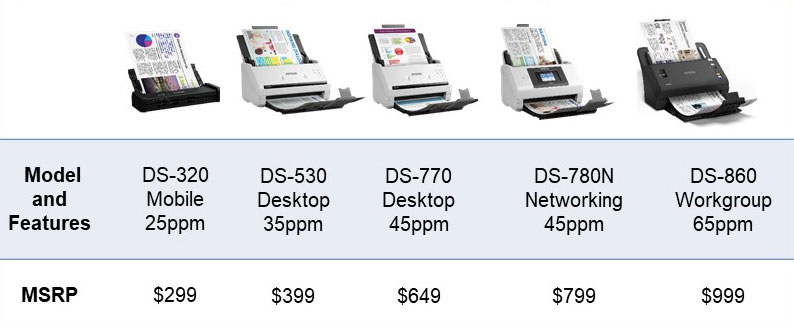
Here are the models you can choose from:

Epson Model Features MSRP
DS-320 Mobile, 25 pages per minute $299
DS-530 Desktop, 35 pages per minute $399
DS-770 Desktop, 45 pages per minute $649
DS-780N Networking, 45 pages per minute $799
DS-860 Workgroup, 65 pages per minute $999

With every scanner listed on this page, you also get a 3-year limited warranty, worry-free reliability, and compatibility with virtually all scanner software.

Not sure what you would do with scanner? With a brand new scanner you can:
● Digitize your receipts, invoices, and other paperwork
● Centralize your personnel files in one location
● Clear out the file room and reclaim more space in your office

Is your 2019 resolution to go paperless but you have way more paper than what a single scanner can handle? Don’t worry—we can still help you out. Check out our Document Scanning Quote Calculator to get a sense of how much your conversion will cost in 30 seconds or less.

Either way, what are you waiting for? Contact us via the form on this page (make sure you put “Free Epson Scanner” in the message) or give us a call at (630) 321-0601 to get the ball rolling. If you’re on a mobile device, call or click here to contact us.

Don’t wait – this deal won’t be around for long!

*Only one scanner per organization. Businesses must have 500+ employees and never purchased an Epson scanner previously to be eligible for a free scanner. Businesses with fewer than 500 employees must have never purchased an Epson scanner previously to be eligible for a free trial.

2223

publish

2019-01-03 06:00:40

2019-free-epson-scanner

Cloud Document Management and Storage FAQ

Datamation’s cloud based document storage system, ImageSilo, is a great way to store your documents digitally. And while the number of companies choosing cloud storage increases every day, its important to weigh your options between on-premise document storage and cloud storage. We’ve compiled some of the most frequently asked questions about cloud storage below, and we’ve also developed a comparison chart to show you the similarities and differences of cloud-based systems and on-site systems line-by-line.

1. How much will it cost me to implement?

When you purchase ImageSilo, your initial investment into the system is tax-deductible, meaning that ultimately, you wont be spending any of your own capital. On-site systems, on the other hand, are not tax-deductible, so your capital expenditure will be much higher.

2. Do I have to pay for individual user licenses?

ImageSilo allows your company to have unlimited users, with no licensing fees. This allows information to be readily accessible across projects, departments, and business locations. Most on-site systems charge per system user, which means the more users your company has, the more fees you will incur.

3. How does IT maintain a cloud system versus an on-site system?

Cloud systems like ImageSilo do not require any maintenance from your IT team! Instant upgrades are performed by Digitech Systems, and the information is monitored automatically, 24/7. This means that your IT team is free to deal with more immediate issues that help drive the company forward. An on-site system requires regular maintenance from your internal IT team.

4. What is uptime, and why does it matter?

Uptime is the amount of time that a system is up and running, measured in percentages. ImageSilo has an unmatched uptime of 99.999% since 1998, which means that in 20 years, the ImageSilo system has almost never been down. This matters because systems that experience frequent downtime may not be as secure, and are obviously not as accessible at all times. ImageSilo has a proven track record of being continuously operational.

5. How long is the contractual obligation with either type of system?

Most on-site systems have a contractual term of 23 years, during which you are obligated to use that system. ImageSilo, however, can be used month to month. If you find another system, you don’t have to wait years for a contract to expire.

6. Will our information be secure when it is stored digitally?

The security of on-site systems may largely depend on the system that you use, and the actions that your company takes to secure that information. Some companies simply feel safer knowing that their information is on-site, in their own hands. However, that in no way means that cloud storage is less secure. On the cloud storage side, ImageSilo has five layers of security to keep all of your data safe and invisible to even Digitech employees. You can even track who has accessed what information with an audit trail.

7. How long will it take to train employees on a new system?

It depends on the system. If you are replacing your long-standing system with a completely new one that doesn’t utilize any of your company’s current applications, then training will take some time. Because ImageSilo allows your company to use your current line-of-business software and has a point-and-click integration module, it takes about five minutes or so to train employees on the system.

You wouldn’t hire a new employee without checking out their employment history and qualifications, would you? Finding the right document management system is no different. When you are deciding between on-site or cloud-based, use these questions and your company’s needs to guide your decision. Download the chart below for an even more comprehensive look at the differences.

on-site vs. cloud document storage

1772

publish

2018-08-14 00:00:00

cloud-document-storage-faq

It’s Time to Update That Outdated Microfilm and Microfiche

It’s time to say it: microfilm and microfiche are outdated. In fact, they’re actually in the Museum of Obsolete Media. So as you plan for the future of your company, maybe microfilm and microfiche shouldn’t be in the picture. After all, it’s important to make sure that you, your employees, clients, and anyone who may need information in the future has accessibility of important documents.

Even if the Museum of Obsolete Media doesn’t convince you, there are still plenty of reasons why microfilm and microfiche aren’t the best choice for information longevity.

You Need Continuously Trained Personnel

If your company continues storing records in these forms, you will need to rely on one or two people who know how to access, process, and store microfilm and microfiche. Continuously retraining people to work with these formats is tedious and time-consuming. By scanning and converting your outdated microfilm, you develop one uniform process and method of storage that you can update according to changing technology. Everyone will know how to access and process important records.

You Need Special Equipment

It is also becoming more and more difficult to find the proper equipment to view microfilm and microfiche. Viewing machines are expensive, and many of the companies that sell them are going out of business. Because the writing is on the wall, there are no new providers to replace those that have closed, which will, in time, phase out microfilm and microfiche readers completely. It wont be long before viewing machines are commercially unavailable.

You Need to Consider Storage Logistics

Accessing and storing microfilm and microfiche are problems that many organizations face as well. Finding the right rolls in a room full of them can take hours, whereas finding digitized records takes a few clicks of a mouse. Rather than spending valuable time attempting to find a single record, employees can stay on task and increase productivity. Furthermore, where you store microfilm can affect its longevity. If conditions aren’t perfectly dry and dark, microfilm can mold and disintegrate from moisture in the air, ruining those records forever.

So what’s the better way to store information?

Newer and more convenient scanning and conversion technology is quickly making microfilm and microfiche obsolete. In order to best protect your records and your company, digitize your microfilm and microfiche with Datamation today.

1774

publish

2018-07-24 00:00:00

its-time-to-update-your-microfilm-and-microfiche

5 Benefits of Digitizing Your Records Management

Regardless of industry, managing records correctly is the best way to ensure ongoing compliance. As your company grows and paperwork multiplies, it becomes increasingly difficult to keep track of retention dates and ensure the security of sensitive information. The best way to keep track of your paperwork and the important information it contains is to digitize your records management system.

Check out five benefits you’ll see immediately if you do.

1. You’ll comply with document retention guidelines.

Document retention is a serious matter, as non-compliance can lead to legal penalties. While some companies think that the best way to avoid these penalties is to just keep everything, keeping documents too long is just as bad as not keeping them long enough. The more information your company has in storage, the higher the likelihood of theft and leaks.

With a records management system, optical character recognition (OCR) and record indexing can be used to track record retention times automatically, alerting you when a document is eligible to be destroyed.

2. You’ll keep records safe and secure.

Storing your records in filing cabinets or boxes doesn’t provide enough security for sensitive information like financial records, health records, and employee documentation. Digitizing records keeps them under layers of password protected security, and also tracks who accesses a document and when. Automatic retention policies eliminate documents once they have passed their retention dates, reducing the potential for information breaches.

3. Your records are backed up in case of a disaster.

You can’t prevent a flood, fire, or earthquake, but you can certainly plan for one. Think about the process of recovering all of your company’s vital records. At best, its tedious, and at worst, you cant recover those records at all. Having digital copies ensures that even after an unpredictable event, you can get back on track immediately.

4. You can access documents within seconds, anytime and from any location.

Digging through dusty piles of paper to find a single record among hundreds can take valuable time out of anyone’s workday. When records are digitized, you can find them in seconds with a simple keyword search, boosting productivity and giving your employees time to focus on tasks that add value to your company.

5. Everyone is doing it.

As more businesses in a variety of industries begin to realize the scope of the benefits provided by digitization, paper management is becoming obsolete. With the ability to access records quickly, keep them secure, and even automate some of the tasks surrounding paperwork, why wouldn’t you digitize?

147

publish

2018-07-10 00:00:00

5-benefits-of-digitizing-your-records-management