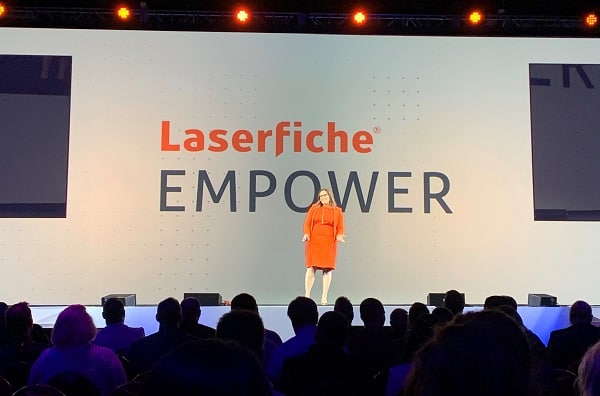
This year, three of us from Datamation headed out to Long Beach, CA for the 2020 Laserfiche Empower conference. Not only were we delighted to escape the cold for a bit (we’re based just outside of Chicago), but it was an excellent opportunity to learn more about Laserfiche, their products, and just why customers love it so much.
We went to classes, keynote speeches, labs, and various presentations to find out as much as we could about how people use Laserfiche and upcoming Laserfiche products. A lot of information was shared, but here are the 9 of the most exciting things from the conference.
Please note: some of these features have already launched on Laserfiche Cloud. Some are still being developed but should be released soon.

1. New Feature: Direct Share
Available now on cloud and coming soon to on-premise systems, Direct Share allows you to share content from your Laserfiche repository with people outside of your organization. So instead of having to download a file and attach it to an email, or download the file and put it on an FTP site, you can enter the end user’s email and the system will send them a link to download it. It’s perfect for all files, but especially those that are too big for email.
Other Direct Share features:
- Document stays in your repository
- You set an expiration date for the access link
- Every interaction is noted in an audit trail
- You set a password for the content
- Long, alphanumeric URLs are individually generated so people can’t just stumble across the document
- Administrators can see exactly what content has been shared and downloaded
2. More Machine Learning (ML) and Artificial Intelligence (AI)
As businesses generate and intake more data, everyone is going to need more assistance to keep track of it. That’s why Laserfiche is focusing on using more machine learning and artificial intelligence in its products.
Some of things ML & AI can help with:
- Clean up repositories by finding duplicate files or moving documents into correct folders
- Intelligent content tagging
- Find and redact sensitive data
- Enhance search by including concepts, synonyms, and picture recognition
- Immediately route invoices
And speaking of invoices, that brings us to our next feature.
3. New Feature: Smart Invoice Capture
Laserfiche product managers told us that one of the first things they wanted to use machine learning for was processing invoices. However, as anyone who works in accounts payable knows, all invoices are drastically different.
Laserfiche’s machine learning will read the different kinds of invoices and pull out the invoice number, amount due, and other key information without zonal OCR or manual data entry.
The company is hoping to launch the product in the next few months, but you can give it a try right here. And as they told us at Laserfiche Empower, if you upload a sample invoice now, it’s much more likely that Laserfiche will be able to read your invoices when it officially launches.
4. Laserfiche Helps with Contract Lifecycle Management
Knowing that contract lifecycle management keeps growing in complexity and that mismanagement of contracts can be very costly, Laserfiche wants to be a solution.
By using Laserfiche to manage your contracts, you can:
- Use electronic signatures that integrate directly with Laserfiche
- Don’t have to print out hundreds of pieces of paper
- Save time by sending contracts with Direct Share
- Automate and monitor every step of the lifecycle
You can learn more about managing contracts here.
5. New Solution: Laserfiche Vault
Laserfiche Vault is perfect for an industry like finance, where it’s imperative that you store documents for a set time and they must be in a non-rewritable, non-erasable format that meets WORM (Write Once, Read Many) requirements. Basically, once you put a document in your Laserfiche Vault, you can’t edit it at all until it meets its retention period and is purged.
Laserfiche Vault is only on cloud, but it’s simple to set up. It only takes two clicks to change a repository to Laserfiche Vault. Again, as anything inside Laserfiche Vault is unchangeable, it’s recommended that you set up a brand-new repository. You wouldn’t want the documents you use every day to suddenly be inaccessible!
A cloud-based system means that once your files are uploaded, they’re backed up in data centers across the world. So even if one data center has a problem, you won’t lose your important documents.
Other features of Laserfiche Vault:
- Simplify compliance, even with the most stringent regulatory requirements
- Designed specifically for audits
- Laserfiche can act as a designated third party to handle requests from the SEC

6. New Feature: Robotic Process Automation (RPA)
Laserfiche Cloud recently launched RPA (also known as “bots”), but we really got to see them in action at Empower. We attended a demo where we watched the product manager create a bot to transfer data from one system into Laserfiche to assist in an HR onboarding process.
The best part? All three of us walked away from that class ready to go program a bot. The bots don’t require any coding, so even non-technical employees can program them.
Robotic Process Automation is used to automate repetitive tasks, integrate legacy applications that may not have an API, and minimize data entry errors. As the product manager put it, it’s the right tool to close any automation gaps in your workflow.
If you want to learn more about RPA, make sure that you check out our blog post: The Beginner’s Guide to Robotic Process Automation (RPA)
7. New Feature: Customize Laserfiche Forms Without CSS
If you’ve been using Laserfiche Forms, then you know that while a form is simple to build, you could only put fields in a straight line. If you wanted to customize anything about the look or feel, you had to use CSS, get a developer, or ask your Solution Provider.
Soon you’ll be able to reposition form fields with easy drag and drop. You can place multiple fields on one line and then resize how large you want the boxes to be.
As a bonus, you can also use this layout editor to change the location and placement of fields on the metadata pane within the repository.

8. New End-to-End Industry Solutions
Historically, organizations tailored their Laserfiche software specifically to their needs: you start with the basic document management and add on other products.
As a Laserfiche Solution Provider, we still believe that’s the best way to get the perfect system for your business (and of course we’d be happy to help craft that with you!). However, there is a lot of functionality within Laserfiche and it can be a little overwhelming to start. This is especially true if you want to get your system up and running as quickly as you can.
The solution? A bundle of Laserfiche products and features selected specifically for your industry. With tens of thousands of installations, Laserfiche knows which tools and business processes organizations within the same industry tend to use.
These solutions mean easier pricing, simpler installation, and powerful functionality at launch.
9. Laserfiche Aspire
Laserfiche Aspire is the one-stop-shop for anything related to learning and training for Laserfiche. To access it, go to the Laserfiche support site, hover over the word Learn, and then click Aspire. If you haven’t access certification courses before, you will be prompted to make an account. You do need to be a Laserfiche customer to access these resources.
This site has everything from 3-4-minute quick tip videos to robust Laserfiche certification courses. Like your favorite streaming service, Aspire has content grouped into “Featured,” “Most Popular,” and “Inspired by Your Subjects.” The platform uses machine learning to analyze which courses and videos you’ve already completed to suggest what content you’ll like next.
Laserfiche Aspire consolidates formalized learning content and guides. If you’re looking for support, make sure that you contact your Solution Provider or visit Laserfiche Answers.
This wasn’t even close to everything discussed at Empower. We learned a lot and we’re excited to work with our customers on even better ways to automate their business processes.
Did you attend Laserfiche Empower? If so, do you agree with us? If not, which are you most excited about? Reach out to us on LinkedIn or Twitter to let us know!
If you’d like to learn more about Laserfiche, don’t hesitate to contact us or give us a call at (630) 321-0601.
4694
publish
2020-03-05 14:41:12
laserfiche-empower-2020
 Before making any improvements, you’re going to need to have a full understanding of your current documents. Take an inventory of all your current business documents. Make sure that you touch base with all departments within your company as there are operational documents, HR files, accounts payable, tax documents, invoices, security logs, etc. and you want to have everything accounted for.
 This isn’t always the easiest question to answer. Some documents have specified retention periods due to local and federal laws or compliance guidelines. In addition to that, it’s likely that your organization has created some of their own retention rules.
 When you’re planning your move, you’ll want to make sure that you have access to important files that you could need at a moment’s notice. Consider this as you’re boxing up files for the move.
 PDF files are one of the most common file formats for scanned documents (and just about any kind of electronic document). Adobe designed the format so metadata, which is descriptive information about the file, could be captured from any application. Best of all, most computer users are familiar with the format and how to use them.
 TIFF files are the other most common file format for scanned documents. These are image files that hold a lot of detail. TIFF files also can compress very well and are commonly used to store scanned business records, patient files, student files, and government records.
 JPEGs are one of the most common image file formats for digital photography and web images, but not usually the best choice for your scanned documents. As images are resized or modified, the quality and data can be lost.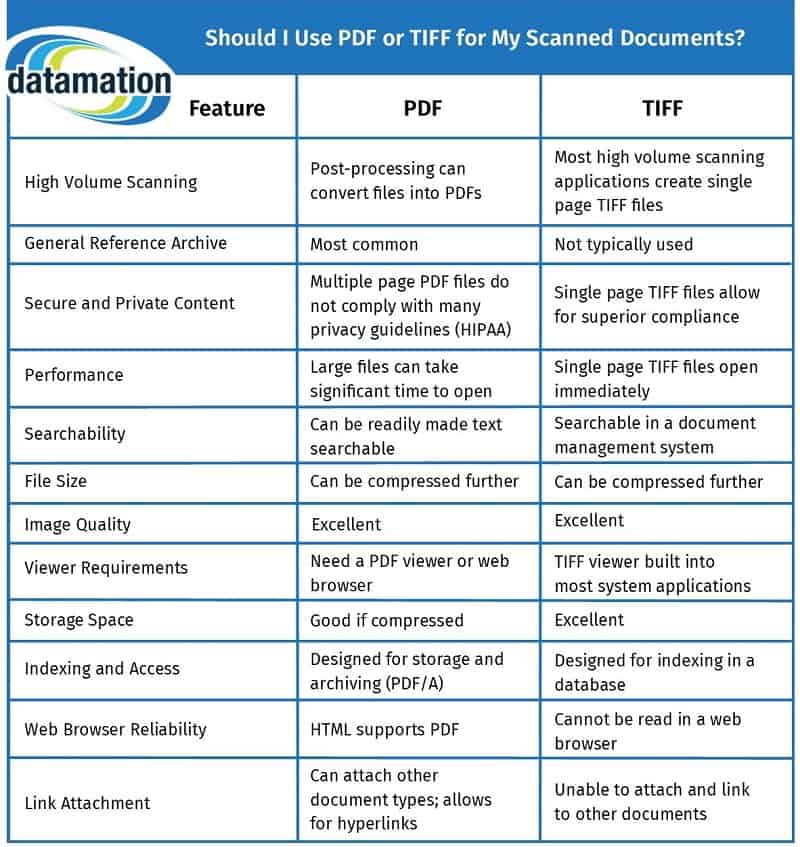
 As we mentioned earlier, if you’re using a true content management system for your files, then you can store everything you want in whatever format you want. There’s no need to convert any files unless your business has certain standards for storing documents.
 Cost savings comes first because the savings are truly substantial. When you automate your accounts payable processes, you’ll see significant cost savings across the department.
 No matter how great your vendors are, they’re going to get annoyed if you continually pay them late.
 We don’t need to tell you why 2- and
  Even though they’re important, nobody looks forward to an audit. Combing through files just to find a single document is time consuming for both the employees and the auditor.
 There are two methods for implementing a document management system: on-premises software or an outsourced cloud.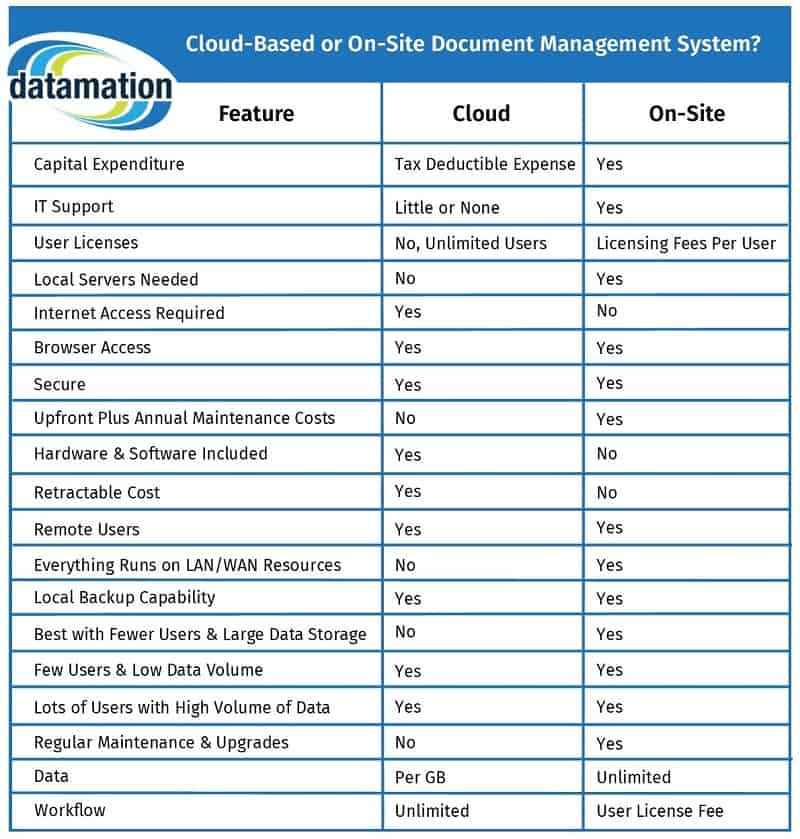
 The last level is implementing advanced system features to have a fully integrated document management solution. This is basically your enterprise content management, or possibly
  The most commonly implemented advanced feature is
  The main benefit of