
Illinois Student Online Personal Protection Act (SOPPA)

If you work for an Illinois K-12 school district, then you’re likely aware about the changes to the Student Online Protection and Privacy Act (SOPPA). These changes require school districts to do more heavy lifting when it comes to keeping student data safe and secure. They went into effect on July 1, 2021.

There’s a lot to cover with SOPPA, so feel free to use these links to skip to a section:

Datamation co-hosted a webinar about SOPPA that contains much of the following information.

SOPPA Background and Legislative Intent

The intent of the SOPPA Act is to ensure the protection of student data when collected by educational technology companies. While the data may be used for beneficial purposes such as providing personalized learning and innovative educational technologies, the data is also susceptible to breaches. The Act requires additional safeguards to protect student data collected by educational technology companies. SOPPA also requires that companies use the data for beneficial purposes only. Again, became effective as of July 1, 2021.

Schools today increasingly use a wide range of online services and other technologies to help students learn. However, educational technology companies must ensure the privacy and security of student data collected. Schools and educational technology companies must create safeguards to keep private information secure.

The need for SOPPA arose out of various data breaches that compromised personal information in an online student data system.

Datamation Imaging Services complies with SOPPA by using extensive security and privacy measures in its systems and practices to ensure the use of any content or data in its systems is protected and used specifically for the benefit of the district only.

Educational Technology in Schools

While student tracking appears to be less publicized at the elementary and high school levels, big tech’s presence in classrooms looms large. In the 2017-2018 school year, the top five digital products used in K-12 classrooms were from Google; it’s a trend some call the “Google-ization of the classroom.”

With the popularity of Google’s G Suite for Education — a collaborative Google platform with more than 90 million users worldwide as of April 2019, according to estimates provided by the company to Teen Vogue — some worry about how the tech leviathan may be using kids’ data.

In their privacy notice for the product, Google does generally lay out how it collects user data but advocates and parents are concerned about specifics.

What Is Covered under SOPPA?

SOPPA covers Personally Identifiable Information (PII) or material or information that linked to personally identifiable information or material in any media or format that is not publicly available.

Under SOPPA, the definition of school is any preschool, public kindergarten, elementary or secondary educational institution, vocational or secondary educational agency or institution. This includes private or nonpublic schools.

Illinois School District SOPPA Requirements

Below is a high-level overview of the new requirements. Please refer to the legislation for specific timelines and components of each element. School districts must:

  • Annually post a list of all suppliers/providers of online services or applications utilized by the district.
  • Annually post all data elements that the school collects, maintains, or discloses to any entity. This information must also explain how the school uses the data, and to whom and why it discloses the data.
  • Post contracts for each operator within 10 days of signing.
  • Annually post subcontractors for suppliers/providers.
  • Post the process for how parents can exercise their rights to inspect, review and correct information maintained by the school, operator, or ISBE.
  • Post data breaches within 10 days and notify parents within 30 days.
  • Create a policy for who can sign contracts with operators.
  • Designate a privacy officer to ensure compliance.
  • Maintain reasonable security procedures and practices. Agreements with vendors that handle PII must include a provision that the vendor maintains reasonable security procedures and practices.

Strategy to Comply with SOPPA

For organizations to comply with SOPPA, it is critical to designate an individual responsible for compliance, similar to that of a FOIA officer. This person must be knowledgeable of the terms of the SOPPA Act as well as put practices in place to ensure the district meets the terms of SOPPA.

For example, for years financial institutions and pharmaceutical companies have been vetting prospective vendors to ensure their system security and practices were thoroughly secure and provided appropriate levels of privacy. Many of these organizations have incorporated this into their purchasing process. They also have a vendor relation and/or compliance person or department tasked with screening partners and vendors.

School District Duties
animated checklist iconThese are duties that public school districts must follow:

  • School districts must adopt a policy for designating which school employees can enter into written agreements with operators.
  • Each school shall post and maintain on its website or, if the school does not maintain a website, make available for inspection by the general public at its administrative office:
    • An explanation of the data elements of covered information collected by the school
    • A list of operators/vendors/suppliers that the school has an agreement with
    • Procedures a parent must use to access covered information
    • A listing of any breaches realized
  • After a determination of a breach of covered information maintained by the school, a school shall notify, no later than 30 calendar days after receipt or the notice or determination that a breach has occurred, the parent of any student whose covered information is involved in the breach.
  • Each school must implement and maintain reasonable security procedures and practices that otherwise meet or exceed industry standards designed to protect covered information from unauthorized access, destruction, use, modification, or disclosure.
  • Each school may designate an appropriate staff person as a privacy officer, who may also be an official records custodian as designated under the Illinois School Student Records Act, to carry out the duties and responsibilities assigned to schools and to ensure compliance with the requirements of SOPPA.
  • A school shall make a request to delete covered information on behalf of a student’s parent if the parent requests from the school that the student’s covered information held be deleted. However, the deletion of the covered information must not be in violation of state or federal records laws.

Again, these requirements apply to public schools only. Private schools do not have to meet all of these requirements. If you work for a private school, please seek guidance from your legal counsel.

Datamation and SOPPA Compliance

SOC Audit & Compliance
As business continues to shift into remote work, companies not only need to have easy access to their documents online but also must consider the security of those sensitive documents while being digitized. Finding a company you can trust to have the highest security standards is vital when seeking a partner to outsource processes such as mailroom, document scanning, cloud document management software, and workflow automation services.

Since 2014, Datamation Imaging Services continues to receive its SOC 2 Type 2 Report. SOC 2 Type 2 is an audit that guarantees a business process outsourcing (BPO) partner has successfully implemented and follows a set of operating procedures that ensure all documents are handled securely while in their facility. A SOC 2 Type 2 accreditation is a guarantee that an organization follows both internal and external compliance guidelines accordingly.

A third-party completes the accreditation and audit. The third-party audits internal processes for a period and makes sure up to five “trust principles” are being met. Those five standards for the compliance guidelines are: security, confidentiality, availability, processing integrity, and privacy. Passing the accreditation process means that a third party has verified a business is trustworthy. The business has a clear process in place to protect their clients’ sensitive information.

In summary, passing a SOC 2 Type II audit ensures that all customer data is handled in a secure, private, and confidential manner.

Please contact Datamation if you would like a copy of our SOC 2 report.

Safety & Privacy Protocols
security lock remote work document managementDatamation implements many practices and protocols to ensure compliance with SOPPA. These include:

  • Encryption: All data is encrypted in transit as well as at rest. All connections to the system are secure via HTTPS. All encryption pass phrases are stored in an encrypted state.
  • User Sessions: System usage is granted using a unique session ID that is passed between the system and the user. The session ID is also encrypted. Systems will automatically disconnect user sessions after a defined period of inactivity.
  • SSL: All external facing portals, where customers access their data, are secured via SSL.
  • Facility and Network Security: A limited number of staff have physical access to the facility. Logical access to the networks is in place and monitored.
  • Vulnerability Assessment: A third party performs regular vulnerability assessments using tests and monitoring to identify and resolve critical risk vulnerabilities.
  • Intrusion Protection Systems: Administrators constantly monitor system firewalls and IPS logs to ensure system usage.
  • Mirrored/Backup: Sites are securely backed up synchronously and in a separate location using a separate power grid.
  • Inaccessible Data: All systems used never expose customer data to a public network. An internal secure network stores data on a separate server from any other database or data.
  • Secure User Access: Users must authenticate to the application with unique user IDs and complex passwords that change regularly.
  • New User Authorization: Requests for new user accounts must come from an authorized client contact. In addition, policies exist for modifying user access and the removal of users who no longer need access.
  • Surveillance Cameras: The Datamation facility has security cameras that monitor production activity as well as facility access.
  • Data Classification: Policies and procedures are in place for classifying data based on its criticality and sensitivity. Proper classification will define protection requirements, access rights and restrictions, and set retention and destruction requirements.

Masking of Personally Identifiable Information (PII) Data

Security settings and user rights can mask or hide Personally Identifiable Information (PII) Data elements. In addition, systems can redact and encrypt data for additional security.

Data Retention and Destruction

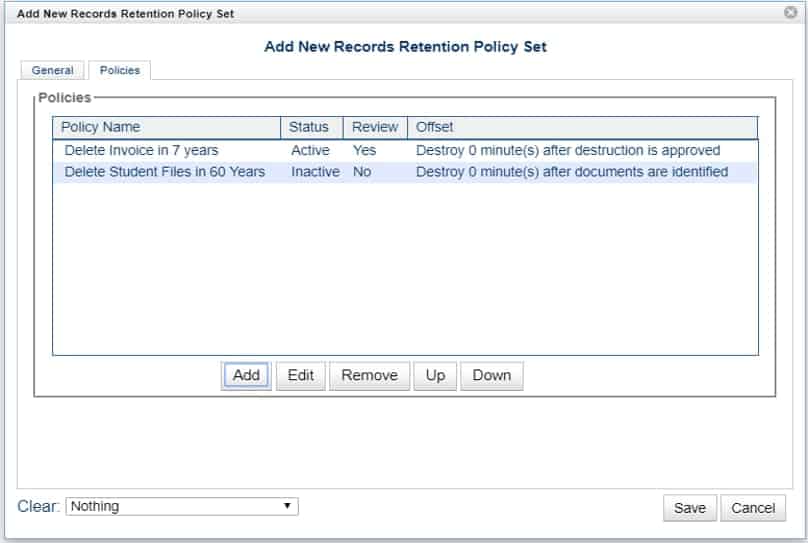
When confidential information meets its retention requirements, the system regularly and systematically tracks and destroys that information. See the following graphic for sample records destruction rules.
In Summary

Datamation Imaging has been studying SOPPA since 2019 to understand and comply with this legislation. Datamation’s services and systems provide school districts an increased ability to comply with not only SOPPA, but FOIA, NCLB, FERPA, and other compliance guidelines.

Please note that the data in this post is collected information and recommendations.  A school district should gather final information from its legal counsel.  Datamation uses, and recommends, the Tressler Law Firm as they have a team of experts in SOPPA compliance.

In the meantime, it’s important for school districts to learn and adopt practices to ensure that the district, and its information vendors, are in compliance with SOPPA.

Typically, districts maintain records much longer than they should. To address this, a district should:

  • Review, update and approve their document retention schedule
  • Purge paper and electronic files according to schedule
  • Don’t keep what you don’t need to keep
  • Keep archived, but retained, records in a secure and private content management system. A secure system ensures compliance, retention and privacy guidelines

For more on Illinois school district retention rules and policy, check out these resources:

If you have any questions about how Datamation works with school districts or are interested in our ultra secure and SOPPA-compliant solutions, do not hesitate to contact us or call (630) 321-0601. If you currently work with Datamation, you can download a PDF copy of this post as a SOPPA exhibit.

6191

publish

2021-04-18 11:00:29

student-online-personal-protection-act-soppa

Top 3 Areas Driving Demand for Digital Files Due to COVID-19

When state governments enacted stay at home orders to slow the spread of COVID-19, the need for digital files skyrocketed. While many companies were already making a transition to paperless offices or had formal work from home policies, there some that were still relying heavily on paper.

As a document scanning and management company, we’ve seen a large interest in digitizing files in three areas: human resources, mailrooms, and microfilm records. These three departments are rapidly digitizing, no matter what the industry. This makes sense as all of these areas require timeliness, privacy, and accessibility for their records.

Let’s get into why these areas are seeing such a demand in digitizing.

1. Digitizing Human Resource Records and Processes

Human Resources is by far the most common area where businesses are scanning their records. We’ve spoken with industry peers across the country and they are also seeing a huge demand in human resources scanning.

And really, this makes a lot of sense. Human Resources is heavily dependent on paper and information. They require lots of processes and approvals for a variety of daily functions. When offices closed, they didn’t have access to their filing cabinets. But employees still needed to perform essential functions like hiring and onboarding. Having all existing and incoming personnel paperwork digitial enables the HR employee to work productively even while remote.

Here at Datamation we’ve seen a large increase in web traffic and calls about scanning HR files. Some are smaller companies that previously relied on paper-based processes. However, most are large companies with multiple offices that absolutely need virtual access and digital routing of personnel records. Without the ability to access their records virtually, HR employees are heading to the office to access records. Depending on the company, this can require management clearance, an exception to the remote work policy, and an office cleaning. Not to mention it can possibly compromise the employee’s health and safety.

2. Incoming Mailroom Processing and Scanning

Even if your employees aren’t in the office because of COVID-19, your mail is still heading there. As many companies don’t want to compromise the health of an employee, or need to make cuts due to the current recession, they’re looking to outsource their mailroom.
The process is simple: incoming is mail is picked up or routed to a scanning company (like us!) or sent to a P.O. Box managed by the third-party company. The company opens, scans, and indexes the mail by the intended recipient. After that, the digital images are uploaded to an FTP site so the company can download the images and process them accordingly, or a cloud-based document management system so each user can access their own mail independently.

Receiving your mail digitally enforces privacy. It also ensures quick document delivery to remote workers for prompt processing. Businesses need to receive about 50 pieces of mail per day to really see the benefit, but it’s simple to implement and cost-effective.

3. Scanning and Digitizing Microfilm and Microfiche

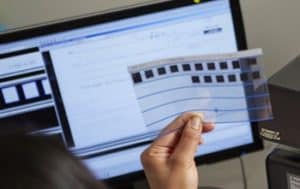
One of the most surprising things has been the increase in demand for microfilm scanning. While converting microfilm and microfiche to digital is one of our standard services, we’ve seen organizations of all sizes and industries reach out about digitizing this type of media.
This is because so many more people are working remotely and can’t access the microfilm and appropriate reader equipment at the office. For any company that was considering a conversion but wasn’t quite ready to make the investment, the pandemic reshuffled their priorities.

Records on microfilm and microfiche are generally archival in nature, so they don’t need to be accessed that often. But when they do (for example: when needing to check a 45-year-old life insurance policy or a 57-year-old student record), someone still has to go find the right piece of fiche or roll of film and then use antiquated equipment to find the right cell. Digitizing these records doesn’t just mean instant access at home—it also means that you never have to use a microfilm reader again.

Digitizing these records also increases their privacy. You can lock a digital file in a content management system with a password and/or user permissions so only those with the proper access can see it.

Finally, converting film and fiche to digital images means that the data will be around forever. Despite early claims that microfilm and microfiche could last for hundreds of years, much of it has started to degrade.

Other In-Demand Applications for Document Scanning

These three areas have seen a huge increase in digital files, but those aren’t the only places. Here are a few other applications for document imaging that we’ve worked on over the past few months:

  • Customer Service: With customer service employees working from home, they don’t have access to customer files in an office filing cabinet or on a server. Virtual access allows them to maintain a high level of customer service while working remotely.
  • Contracts: Storing contracts on a content management system allows for secure sharing. Proper approval parties can receive contracts via workflow. A system can keep all versions of this document without any kind of physical copy.
  • Tax Records: Sales tax, payroll tax, state tax, tax exemption and other large tax records frequently require office access to see these records. This is especially true in the event of an audit. Now employees and auditors alike can access these files remotely.
  • Legal Files: Virtual access to legal files provides fast access and more time for lawyers to perform billable services.
  • Accounting: Many companies are either outsourcing their accounts payable or using an in-house system where invoices can be digitized, and key data extracted so that their system can then automatically receive, route, and pay invoices.

The demand for digital files and these applications has increased this year. And it’s unlikely this will end when the COVID-19 pandemic does. Workplaces have been trending digital for the last few decades, and this was simply a push to accelerate the process. With fewer costs, more productivity, and less needed office space, there are so many benefits from having your records digitized and on a document management system.

If you need to digitize your files or a better way to access those files, we’re happy to help. Contact us or give us a call at (630) 321-0601.

Has your company adopted digital files for any of these departments or applications? What other trends have you noticed because of the pandemic? Find us on Twitter or LinkedIn.

6156

publish

2020-12-09 06:00:05

demand-digital-files-covid-19

Cloud Document Management and Storage FAQ

Datamation’s cloud based document storage system, ImageSilo, is a great way to store your documents digitally. And while the number of companies choosing cloud storage increases every day, its important to weigh your options between on-premise document storage and cloud storage. We’ve compiled some of the most frequently asked questions about cloud storage below, and we’ve also developed a comparison chart to show you the similarities and differences of cloud-based systems and on-site systems line-by-line.

1. How much will it cost me to implement?

When you purchase ImageSilo, your initial investment into the system is tax-deductible, meaning that ultimately, you wont be spending any of your own capital. On-site systems, on the other hand, are not tax-deductible, so your capital expenditure will be much higher.

2. Do I have to pay for individual user licenses?

ImageSilo allows your company to have unlimited users, with no licensing fees. This allows information to be readily accessible across projects, departments, and business locations. Most on-site systems charge per system user, which means the more users your company has, the more fees you will incur.

3. How does IT maintain a cloud system versus an on-site system?

Cloud systems like ImageSilo do not require any maintenance from your IT team! Instant upgrades are performed by Digitech Systems, and the information is monitored automatically, 24/7. This means that your IT team is free to deal with more immediate issues that help drive the company forward. An on-site system requires regular maintenance from your internal IT team.

4. What is uptime, and why does it matter?

Uptime is the amount of time that a system is up and running, measured in percentages. ImageSilo has an unmatched uptime of 99.999% since 1998, which means that in 20 years, the ImageSilo system has almost never been down. This matters because systems that experience frequent downtime may not be as secure, and are obviously not as accessible at all times. ImageSilo has a proven track record of being continuously operational.

5. How long is the contractual obligation with either type of system?

Most on-site systems have a contractual term of 23 years, during which you are obligated to use that system. ImageSilo, however, can be used month to month. If you find another system, you don’t have to wait years for a contract to expire.

6. Will our information be secure when it is stored digitally?

The security of on-site systems may largely depend on the system that you use, and the actions that your company takes to secure that information. Some companies simply feel safer knowing that their information is on-site, in their own hands. However, that in no way means that cloud storage is less secure. On the cloud storage side, ImageSilo has five layers of security to keep all of your data safe and invisible to even Digitech employees. You can even track who has accessed what information with an audit trail.

7. How long will it take to train employees on a new system?

It depends on the system. If you are replacing your long-standing system with a completely new one that doesn’t utilize any of your company’s current applications, then training will take some time. Because ImageSilo allows your company to use your current line-of-business software and has a point-and-click integration module, it takes about five minutes or so to train employees on the system.

You wouldn’t hire a new employee without checking out their employment history and qualifications, would you? Finding the right document management system is no different. When you are deciding between on-site or cloud-based, use these questions and your company’s needs to guide your decision. Download the chart below for an even more comprehensive look at the differences.

on-site vs. cloud document storage

1772

publish

2018-08-14 00:00:00

cloud-document-storage-faq

7 Reasons to Streamline Your Employee Record Management

Employee records are incredibly important in order to make sure your employees are safe and qualified, but they are also important for your company’s organizational needs. Your HR department is in charge of those records, ensuring that they are complete and accessible at all times. These records contain sensitive files like medical records, employment history, payroll information, emergency contacts, and more information that if destroyed or stolen, could endanger the company and the employee. Paper records simply can’t stand up to these human or environmental factors. Here are seven reasons to digitize employee record management.

(more…)

5 Benefits of Digitizing Your Records Management

Regardless of industry, managing records correctly is the best way to ensure ongoing compliance. As your company grows and paperwork multiplies, it becomes increasingly difficult to keep track of retention dates and ensure the security of sensitive information. The best way to keep track of your paperwork and the important information it contains is to digitize your records management system.

Check out five benefits you’ll see immediately if you do.

1. You’ll comply with document retention guidelines.

Document retention is a serious matter, as non-compliance can lead to legal penalties. While some companies think that the best way to avoid these penalties is to just keep everything, keeping documents too long is just as bad as not keeping them long enough. The more information your company has in storage, the higher the likelihood of theft and leaks.

With a records management system, optical character recognition (OCR) and record indexing can be used to track record retention times automatically, alerting you when a document is eligible to be destroyed.

2. You’ll keep records safe and secure.

Storing your records in filing cabinets or boxes doesn’t provide enough security for sensitive information like financial records, health records, and employee documentation. Digitizing records keeps them under layers of password protected security, and also tracks who accesses a document and when. Automatic retention policies eliminate documents once they have passed their retention dates, reducing the potential for information breaches.

3. Your records are backed up in case of a disaster.

You can’t prevent a flood, fire, or earthquake, but you can certainly plan for one. Think about the process of recovering all of your company’s vital records. At best, its tedious, and at worst, you cant recover those records at all. Having digital copies ensures that even after an unpredictable event, you can get back on track immediately.

4. You can access documents within seconds, anytime and from any location.

Digging through dusty piles of paper to find a single record among hundreds can take valuable time out of anyone’s workday. When records are digitized, you can find them in seconds with a simple keyword search, boosting productivity and giving your employees time to focus on tasks that add value to your company.

5. Everyone is doing it.

As more businesses in a variety of industries begin to realize the scope of the benefits provided by digitization, paper management is becoming obsolete. With the ability to access records quickly, keep them secure, and even automate some of the tasks surrounding paperwork, why wouldn’t you digitize?

147

publish

2018-07-10 00:00:00

5-benefits-of-digitizing-your-records-management

Document Conversion: Frequently Asked Questions

Whether you run a small family firm or manage a large corporation with multiple locations, document conversion can change the way you do business.

Organizing, storing, and sharing paper documents is not only inefficient, it leaves your company’s information susceptible to security breaches. Document conversion can save your company significant time, labor, and money by streamlining all your processes. This post will discuss frequently asked questions about document conversion.

When should I consider document conversion?

● When many people or departments need access to the same documents. If your business is spread across multiple locations, digitally stored documents make it easy for more than one person to have full access to a document.

● When the documents must be retained for a long period of time. These documents may include blueprints, maps, financial information, or employee records.

● When the documents are highly sensitive and/or vital to business operations and require backups. Document conversion ensures there is always a digital backup if a paper copy is destroyed.

● When storage costs exceed the cost of conversion. Consider not only the cost of storing documents at off-site facilities or cost per square foot for the space in your office, but the cost to find, retrieve, and re-store documents and the employee and client relation costs incurred when you are unable to locate a misfiled document.

What is the difference between scanning internally or outsourcing these services?

Scanning documents internally requires resources. You will need scanners, staff to prepare the documents for scanning, capture and imaging software, and staff for quality control after scanning. Consider the investment required for equipment, software, licensing, upgrades, and staffing to successfully scan your documents in-house.

Outsourcing document conversion means all the resources are provided for you. When you use Datamation, you will also have access to your documents during the conversion process and can track the progress of your project.

What does it cost to convert documents?

The cost to convert documents to digital images depends on several factors:

● How much paper do you need to scan? For reference, a standard bankers box full of paper costs between $130-$220 to scan. If you’re unsure, use our document scanning quote calculator for an estimate of your conversion costs.

● How much document prep is needed? Are the sheets full of paperclips, bindings, and tears?

● How many pages are included in each file?

● Does your company have any indexing or metadata requirements?

How do I select the best document scanning provider?

Make a list of your criteria. What are your company’s needs and wishes? Consider the following:

● Volume of paper. Can the provider accommodate the volume of documents within your timeframe?

● Do your documents need to be scanned in color, grayscale, black and white, or all of these?

● Is there a resolution requirement?

● Do the documents need to be searchable?

● Document destination. Are the documents going into a document management system?

● Image format. What format do the images need to be in?

● Do you need access to documents while the conversion process is taking place?

How do I choose a document conversion file format?

The format of your documents is usually chosen according to the ECM/ERP/EMR system where the documents will reside. The most common format is TIFF. However, if you’re using a document management system, check with your software manager because some prefer files in the PDF format.

Should I keep or destroy the documents once they are converted?

In most cases, the paper documents can be destroyed, but you should always check the legal requirements for your state and industry. Contact Datamation or your state archivist with questions.

This post is part of the Datamation Guide to Document Scanning.

1766

publish

2018-06-12 00:00:00

document-conversion-frequently-asked-questions

FERPA Compliant Cloud Storage: 5 Questions to Ask Before Switching to the Cloud

When your district is considering a cloud storage solution to protect student records, there are several things to consider in order to take inventory of what system your district currently has, how well it is working, and what needs to be changed.

Increasingly, districts have been turning to cloud-based storage to manage their student records securely, and to maintain compliance with FERPA and other regulations. Successful implementation of the cloud takes careful planning, and a clear view of your districts goals. Here are five questions to ask when your district is considering the cloud:

(more…)

FERPA Violations Explained: Student Records vs. Directory Information

Under the Family Educational Rights and Privacy Act, or FERPA, eligible students and parents have a right to privacy for student records. Students and parents must be able to access their records, and certain information within their records cannot be shared without written consent. There is a fine line between student information that can and cannot be shared, and school districts must take care to walk the right side of that line.

(more…)