
Greater Efficiency in Human Resources Leads to Greater ROI

This post is part of The Datamation Guide to Human Resources Records.

In any industry, time is money. Usually, the longer something takes to do, the more it costs, and that includes any kind of Human Resources process within your business. Paper documents are outdated, inconvenient, cumbersome, and most importantly, they reduce your company’s efficiency. And with less efficiency comes a lower return on investment Datamation can provide your company with the tools it needs to implement a solid workflow that will save time, money, and effort while increasing your ROI!

In HR processes like onboarding, training, or payroll, the amount of information that must be shared between departments (originating with yours) is huge. With each employee having several types of documentation filed away, thousands of papers cross HR department desks each week.

The problem with paper is that it can’t be effectively processed in such large amounts. It takes a huge amount of time to find the paper document, pass it from approver to approver, and to finally refile it. The longer it takes to process information, the more money it costs your company.

The only way to drastically reduce processing time is to scan your documents into an automated workflow, eliminating the need to pass along each record or file by hand. This keeps documents from getting misplaced, and also gets them through layers of approval quickly and efficiently.

On average, an employee spends 19.8% of business time trying to find a certain paper document, adding up to about one full day a week. Think about how much more would get done if it took just a few seconds to find a document, and how much of that time could be directed towards targeting problem areas of your company. When you scan your files and store them electronically, any document can be found within just a few seconds with a simple keyword search. The ability to find documents quicker leads to quicker processes in general, which in turn vastly improves customer service. Your company’s time is valuable—make sure it is used wisely.

With the amount of information that crosses your desk on a daily basis, you don’t have time to search for documents that have gone missing or that are stored among thousands of other documents in a filing cabinet. The more time it takes to complete one of your many tasks, the more money your company is spending to keep those processes going. Integrating your documents into an electronic workflow with Datamation will make your company’s processes more efficient, more timely, and less cumbersome.

Call (630) 321-0601 today to discuss the perfect plan for your business.

1754

publish

2018-04-20 00:00:00

greater-efficiency-leads-to-greater-roi
Moving Offices: A Chore Or An Opportunity? 

Moving to a different office takes extensive planning, preparation, and cost. In addition to moving your employees, their belongings, furniture, and more, you also have to figure out how to move the filing cabinets and boxes housing your records and documents. And that doesn’t even include needing to reorganize them in your new office, too. This sounds like a huge undertaking, but it doesn’t have to be. Look at moving as less of a chore, and more of an opportunity to scan all of your files before you move.

Check out the benefits to scanning your files before you move.

Benefit One: Fewer Things to Move

scanning saves money on storage costsThe first benefit that you’ll see when you scan your documents is that you don’t have to haul heavy and bulky filing cabinets and boxes to your new office location. This means that you’ll spend less money on movers and moving trucks, and you’ll have more space to transport other things from your old office. While this is obviously a huge short-term benefit, it is far outweighed by the long-term benefits of document scanning.
Benefit Two: Opportunity to Create or Redo Workflow

Scanning all of your documents allows your company to completely revamp your workflow. Rather than having to manually process invoices, Datamation offers services that can receive, match, and send your invoices for approval to be paid automatically. This frees your employees up from spending hours manually entering and matching data, and is also the closest to error-free processing that you can get. Now, you can pay all of your bills on time and take full advantage of those prompt pay discounts.

Benefit Three: Lower Storage-Related Costs

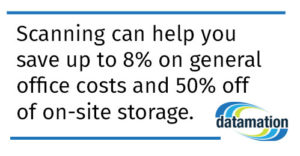
Document scanning can also lower costs on storage, and possibly on rent. Think of how many filing cabinets your office has, and how much space they take up. If you scan your documents well before you move, you may be able to obtain a smaller office, which means that you could potentially save money on renting and leasing that space. Even if you don’t move to a smaller space, scanning can help you save up to 8% on general office costs and 50% off of on-site storage.

Benefit Four: Your Information is More Accessible

Finally, scanning all of your files can make them easily accessible. Rather than spending hours trying to find one document, you can pull one up with just a few clicks using a keyword search. This also ensures that if a document is needed during the move, it can be accessed—something that would be practically impossible with paper documents.

Rather than worrying about the logistics of moving to a new office, look at it as an opportunity to change how your company runs completely. Yes, scanning your documents eliminates the need to haul them along when you move, but it also gives your company a brand new workflow and files that are accessible whenever and wherever they are needed.

This post is part of the Datamation Guide to Office Relocation.

1724

publish

2018-03-27 00:00:00

moving-offices-a-chore-or-an-opportunity

Scanning Documents = Saving Space = Saving Costs

This post is part of the comprehensive Datamation Guide to Office Relocation.

Moving your business to a new location is exciting, but daunting. With the costs of moving trucks, movers, and more, it can really add up, so its important to cut costs when you can.

One of the biggest costs that you encounter may be moving your heavy, bulky filing cabinets that take up a huge amount of space in moving trucks. Scanning your documents before you move can eliminate the costs and inconvenience of transporting your files, and has long term benefits that cant be matched.

If you plan to scan your documents well ahead of moving, you could save big on renting or leasing your new office space. Think of how many filing cabinets or boxes of documents that are in your office right now, and then imagine how much space you would have if you got rid of them.

Has your company been thinking about moving to a larger location? Well you may not have to if you scanned your documents and store them digitally. Since rental and lease costs increase as the amount of space increases, you’ll save money with a smaller space.

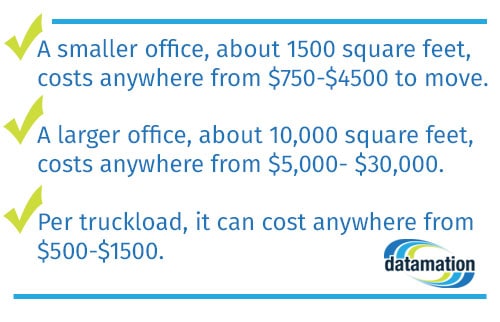
Fewer filing cabinets and boxes may also mean fewer moving trucks or movers, which means fewer costs to your company. To demonstrate where you can save by scanning documents, here are some stats about the average office relocation:

the cost for moving offices

So to recap:

● A smaller office, about 1500 square feet, costs anywhere from $750-$4500 to move, depending on how much needs to be moved.

● A larger office, about 10,000 square feet, costs anywhere from $5,000- $30,000 if there are many employees, workstations, or filing cabinets.

● Per truckload, it can cost anywhere from $500-$1500 depending on how much time it takes to load the truck, how hard it is to load the truck, and the number of movers.

Essentially, the fewer boxes and cabinets you have, the more money you save on labor and space. The money that you save on moving pays for the process of document scanning and management, and has extensive long-term benefits as well.

Scanning your documents keeps your files safe, easily accessible, and organized without taking up any physical space. In an electronic format, documents are safe from fires and floods and also have layers of security that can only be accessed with specific passwords.

That being said, even with this much security, these documents can be accessed within a few seconds by authorized staff, eliminating the need to dig through filing cabinets. Better still, if you need to access a document during the move, you can! Moving offices doesn’t have to disrupt your entire workflow.

Moving offices can be troublesome and expensive, but if you scan your documents before you move, the scanning process pays for itself. With less space taken up by cumbersome filing cabinets and less heavy lifting to do for movers, your business will save big on moving costs, and you’ll reap the benefits of document scanning for years to come.

1734

publish

2018-03-27 00:00:00

saving-space-saving-costs

School Business Managers: Quick Access to Every Record

This post is part of The Datamation Guide to Managing School District Records.

As a business manager, it’s your job to manage the financial, legal, and project matters that confront your district on a daily basis.

Because many of the documents you deal with are financial in nature, you need the most secure system possible, but one that allows you to access any record in a moment’s notice. You also need an efficient workflow that allows you to process information requests, invoices, and more.

Scanning all of your vital documents with Datamation gives you that comprehensive, organized system that you’ve always wanted to help you juggle all of your daily tasks. Keep reading to learn how we can help you with the different kinds of documents you need to manage.

Drawings, Blueprints, and Project Manuals

Documents like large format blueprints and drawings can be difficult to have scanned, as many ordinary scanners don’t have that capability. This means that all of these unwieldy documents have to be stored in paper form, making them difficult to access and maintain. But as these documents need to be kept for as long as the building is standing, it’s important that they are stored securely.

Datamation has both the experience and the equipment to scan any documents that are wider or longer than usual, giving you immediate access to any building or property blueprints.  Datamation can also scan lengthy project manuals that are crucial in providing guidance and reference when planning or implementing a new project.

Accounts Payable/Vendor Records

A huge part of your job is handling the financial matters of your district, and this includes processing invoices, vendor contracts, and more. These documents can be scanned and posted to your accounting system simultaneously.

Datamation can help you take those documents and form a seamless workflow, eliminating the need to manually enter, match, and approve the information on invoices. This also means having immediate access to vendor records, past invoice payments, FOIA request invoices, and bid documents. You can even find a record with a keyword, date, or payment amount rather than having to dig through a filing cabinet or box.

Having immediate access to these important records is vital when it comes to answering questions posed by vendors, staff, or the community.

Payroll Records

Most districts have have payroll records and reports going back for decades, and if they are being stored in paper form, the probability of them being intact and in a single location is low. But if you scan all of these records, you can have them be accessible, secure, and searchable with a few simple keystrokes.

Let’s say that you need to provide proof of employment for an employee that worked in the district 25 years ago. Would you be able to find that record in paper form? When documents are stored digitally, these records can be text searched so you can verify employment within just a few minutes, while keeping them private and safe.

Financial/Banking Records

When it comes to storing banking, district financial, and bid records, the biggest necessity is access. When finances are being questioned, not being able to find a contract or record can damage your district’s reputation irrevocably. How long would it take you to find a three year-old-bank statement if you needed to? Even if you do find it, the amount of time that it would most likely take would also show poorly on your district.

It’s also important to ask yourself if you are keeping up with retention dates. If you are storing records in paper form, it’s likely that you’re not. When you scan your records and implement them into the system, you always know what documents (e.g. check registers and check copies) can be destroyed, and when.

Legal Files

Like financial and banking records, maintaining legal records securely ensures that your district is never caught unprepared during litigation or general investigation.

Datamation allows you to complete FOIA requests in seconds, keep grants on file for later reference, and access legal records when they are needed.

All records are entirely searchable, including that record of a specific case or request from 15 years ago. You can simply type in a name, price, or date and the exact file that you need will come right up.

Save space, time, and trouble with Datamation scanning and management systems.

1732

publish

2018-03-20 00:00:00

business-managers-quick-access-to-every-record

Human Resources Directors: Go Paperless

This post is part of The Datamation Guide to Managing School District Records.

As your school district’s human resources director, you have an immense amount of paperwork that passes through your office, much of it vital to the district’s critical functions and all of it sensitive in nature.

Whether its employee files that include results of criminal background checks or drug tests, information about the districts pension fund or 401(k), or disciplinary matters these important documents must be handled with care. Furthermore, you never know when you will need to access the information you’ve received.

With full access to the best programs on the market, Datamation’s education specialists will work with your HR office specifically to design a software system that meets these diverse and important needs.

Here’s what you can expect from all of our solutions:

Going paperless saves time and space

If your district is still relying primarily or entirely on paper record keeping, Datamation can revolutionize your HR workflow and create a paperless archive of everything you have on file. From there, we can work with you to design a software system that automates much of this workflow, saving your employees time.

That means the file room teeming with records can be cleaned out, and there will be no more tedious half-hour trips to hunt down a piece of paper from 10 years ago. Instead, you’ll have fast and reliable access to all your HR records.

Privacy and security

Datamation understands one of the most critical responsibilities of any human resources department is securing the private information of your district’s employees. From health records to a personnel file, these files need to be safe and secure.

Datamation works with districts who prefer cloud storage and those who maintain their own on-site database to help ensure these files are protected. We will design a system that ensures only the appropriate employees in your district have access to the files you keep.

Compliance with state and federal regulations

School districts are required to keep more paperwork on file than your average private sector business. That includes things like required teacher evaluations, paperwork related to public sector unions, and pension and retirement fund contributions to name but a few.

Failure to maintain these records can turn up in periodic state audits and cause public concerns if regulators find your office is not in compliance.

Datamation will work with you to create a human resources records processing system that meets all state and federal regulations for record retention. Our education specialists understand those rules and the best way to navigate them. That way, when auditors come knocking, you’ll be able to wow them with the ease and organization of a well-kept HR database.

Document retention and disaster recovery

There are two parts to maintaining a top-flight HR database: making sure the information you need is safe and purging the documents you no longer have to keep on hand. An electronic database of HR records can help with both.

There are any number of ways important information can be left inaccessible. Poor filing habits are an obvious culprit, but even the most studious clerks can’t prevent documents from being damaged in the event of a flood, fire or another natural disaster. Your district doesn’t have to be in the path of a major hurricane for important information to be put at risk.

And then there’s the other problem: keeping too much information you don’t need. Failure to purge old records takes up space and improper disposal of those documents can expose your district and its employees to identity theft and other forms of fraud.

An automated HR database solves all these problems. Cloud storage or off-site database backups are the most secure way to prevent records from being lost, damaged, or destroyed. And that very same database will tell you when records are able to safely be deleted.

Ready to learn more? Contact Datamation today!

1729

publish

2018-03-19 00:00:00

hr-directors-go-paperless

How Does FERPA Work?

This post is part of The Datamation Guide to Managing School District Records.

FERPA refers to the Family Educational Rights and Privacy Act, which is designed to protect the rights to privacy that a student has over their school records. This act applies to all schools who receive valid federal funding under the U.S. Department of Education.

Before a student turns 18, the parents or guardians of the student are entitled to determine the privacy of their child’s records, but these rights transfer to the student at age 18 or if the student pursues education beyond high school.

In order for schools to release a student’s educational information, the law requires that the school have written permission from a parent or the eligible student. The only occasions in which the school can release information without written consent are as follows:

● When a school official is showing genuine educational interest in a student

● When the records are released to the school the student is transferring to

● When the party requesting the records are doing so to provide the student with financial aid

● When an organization is conducting a study for a school

● When the records are needed to comply with a judicial order or lawful subpoena

● When they are needed by appropriate officials during a health or safety emergency

● When they are needed by state or local authorities of the juvenile justice system

Maintaining compliance with FERPA is difficult and time-consuming when your district is working with paper records. Finding the right records among thousands takes time that you often don’t have. Paper records are also a huge security liability, highly susceptible to fire and water damage, and easily accessed by those who don’t have permission. When you scan and digitize student records with Datamation, your district becomes the perfect candidate for some of Datamation’s FERPA-compliant programs.

We work with a program called Scriborder that makes it easy and incredibly secure to request and send transcripts and other student records. Each request can be fielded directly from your school website through one portal. When the records are sent digitally, if there is a security or other issue in transit, that private student data is immediately captured. This way, student information is safe, even while it is being sent. Scriborder eliminates the worries that accompany sending out private student information.

ImageSilo is a program that allows your district to store all of your records in a digital cloud, making it safe, accessible, and organized. With five levels of security, only those with strict access can see student record information. Because the information is being stored digitally, it is also always protected from floods, fires, and any other natural disasters. At the same time, any record can be accessed with a simple keyword search, making them easy to find in the event of an emergency.

1727

publish

2018-03-18 00:00:00

how-does-ferpa-work

Automated AP Processing Can Save Your District Money

This post is part of The Datamation Guide to Managing School District Records.

While most industries face issues with manual accounts payable processing, schools simply don’t have the funds to waste on the extra costs that come with manual data entry and processing. Manual processing is costly, error-prone, and time-consuming between approval, matching, data entry, and more. Manual processing is outdated, and luckily, unnecessary when you automate your AP processes with Datamation.

The average invoice costs $22.75 and 16.3 days to process—and that’s just a single invoice. Between cafeteria food vendors, equipment vendors, and more, the average school district handles hundreds of invoices per year.

The amount of resources that go into AP processing reaches beyond money—employees who enter this data could be spending their time enriching student experience. Besides being a waste of valuable resources, manual entry is subject to a sizable margin of human error. When employees spend hours reading and entering numbers, it’s probable that tired eyes will lead to mistakes, which are costly and time intensive to fix.

When AP processing is automated, the difference is dramatic in the amount of time and money saved. Automated invoices cost $3.40 and 6.1 days on average to process. Every step of the process is automated, and the costs of printing, mailing, matching, and fixing data entry mistakes are eliminated.

In addition, companies who automated their AP processes were able to take full advantage of prompt pay discounts, which are offered to businesses who pay their invoices early or on time. On average, only 16% of districts and businesses who don’t automate are able to take advantage of prompt pay discounts. Comparatively, 47% of districts or businesses who do automate are able to use these discounts.

Better still, the money saved by automation can be put towards better equipment, more educational programs, and funding for clubs or teams. Without having to spend time entering data, staff productivity will increase and be directed towards school-wide improvement.

Datamation can take AP processing from an inefficient, time-consuming chore to a streamlined, nearly effortless workflow. The changes made to this process have widespread benefits: higher employee productivity, huge savings, fewer errors, and more funding for the important things within your district.

Datamation can make a world of difference in how your district runs, and gives you only the best results for the well-being of your students and employees.

1708

publish

2018-03-14 00:00:00

automated-ap-processing-can-save-your-district-money

Digitizing School Records for Better Communication

This post is part of The Datamation Guide to Managing School District Records.

While there are numerous benefits to digitizing student records, one of the biggest benefits is that communication between schools within a district, and even between different districts, is vastly improved. Datamation offers a time-tested and secure solution to the growing number of student records as students enroll into and transfer from your schools.

Datamation can take every single record from the schools in your district and digitize it. Depending on your preference, they’ll either pick them up and bring them to their secure scanning facilities, or scan them on site. Because our barcode system allows you to track the progress of the scanning process, you’ll always be kept in the loop. You can even access the documents digitally during the scanning process, if needed.

The real benefits begin when the scanning is finished.

Rather than having to dig through piles of paper to find that one specific record, any record can be found within seconds with a simple keyword search. This is ideal for medical emergencies, or any other instance in which a students records would been to be accessed quickly.

Digitizing student records also protects them from physical harm, like fires or floods, and from being seen by unauthorized personnel. Under FERPA, or the Family Educational Rights and Privacy Act, student records must be kept private and secure with few exceptions. Datamation offers FERPA-compliant storage programs that keep student records safe, and also ensures that your district is compliant.

If your district is finding that its difficult to manage and send requested transcripts or other records, Datamation offers Scriborder, a program that allows your district to manage all record requests (transcripts, transfer requests, etc.) from one portal on your schools website.

Scriborder allows your school to send out records to students requesting any document that they need for college or employment reasons. Students or alumni may request their records directly on the school website, which can be processed and sent out electronically.

Once the record is sent out, the requester is immediately notified. If there is an issue or the record is intercepted as it is mailed, the students data is immediately captured before it can be seen.

Because Scriborder works out of your schools current website, it doesn’t take much to train staff how to use it. Scriborder even sends out their own employees to train your staff, making the transition painless.

While digitization and Scriborder with Datamation generally make communication within a school or district more efficient and smoother, being able to quickly access and send records has the potential to make any kind of student transfers easier.

With paper record keeping, finding those student records can take an unnecessary amount of time that could be spent bettering your district. When records are immediately accessible and can be sent electronically, it also makes sending them from one school to another much more efficient. What took days before the records were scanned now only takes seconds, simplifying student and record transfers. Scanning your student records with Datamation not only improves communication within your own district, but also allows for effective exchanges between neighboring districts.

1709

publish

2018-03-14 00:00:00

digitizing-school-records-for-better-communication

Keep Your Student Records More Secure Than Ever

This post is part of The Datamation Guide to Managing School District Records.

Keeping your student records secure is of the utmost importance for your district. Under FERPA (Family Educational Rights and Privacy Act), students have the right to privacy concerning their records, and with new changes to the Student Online Privacy and Protection Act (SOPPA), it is the school’s responsibility to keep those records safe. Many districts still maintain their student records in paper form, which makes them susceptible to physical damage and prying eyes. Datamation can ensure that student records will be as secure as possible, and accessible to the right people.

Because paper records are, well, paper, if there were to ever be a fire, flood, or natural disaster in or around your school, those records would be badly damaged or even destroyed completely. Attempting to recover these documents would involve extensive time and effort that could have been directed elsewhere. Because these records are stored in filing cabinets or boxes all in one room, no one can be sure who has accessed what record, and at what time.

The first step in making these records as secure as possible is to digitize them. Though that may seem like a daunting task to have thousands of documents scanned, Datamation can pick up these files and scan them either on-site or at our own secure facilities. You can also have access to these documents as they are being scanned, if need be. Your district can even track the progress of the scanning process.

Beyond having your records scanned and digitized, Datamation offers many more ways to manage your digital documents. ImageSilo is a great example of a storage and management system that keeps your records both safe and organized. Because your documents are stored in a digital cloud, they can’t be harmed by fires or floods, and with five layers of security, records are safe from human threats as well. Unlike paper records, access to digital records with ImageSilo can be tracked—you can see exactly who accessed the records and when.

Scriborder is also a great program that can be implemented to more securely send requested academic documents like transcripts, diplomas, certificates, and more. Scriborder enables school districts to manage all requests through one portal. Orders are made online, and the document is sent digitally rather than by mail. If there are any issues detected during the mailing process, the student’s private data is automatically captured before it can be seen by anyone. Because the data is sent digitally, it is much more secure than if the transcript was sent by regular mail.

Scanning your student records with Datamation is just the first step in making the records more secure than ever. Paper records and their storage are outdated, risky, and inconvenient, especially where sensitive records are concerned.

1711

publish

2018-03-14 00:00:00

keep-your-student-records-more-secure-than-ever

Managing School Board Meeting Minutes

This post is part of The Datamation Guide to Managing School District Records.

Digitizing and storing records doesn’t just apply to student and personnel records. Managing and storing School Board meeting minutes electronically gives your district reliable access to a comprehensive record of important district decisions.

And where do those important district decisions happen? School board meetings. These meetings include decisions like appointments to new offices, donation approvals, vendor contracts, treasury reports, project progress reports, the announcement of new programs, and changes in policy. The minutes taken from these meetings are vital records of each and every decision made by the School Board, and can be referenced if one of the decisions is questioned.

Meeting minutes can also be referenced in order to identify patterns in voting. For example, voting patterns can be examined over a period of 5 years, identifying patterns with board members individually, or the Board as a whole. In short, these records may protect any decisions made by the school and the Board.

Because these records are so important, storing them in paper form makes them susceptible to fire, floods, or just getting lost in the fray. It also takes considerable time to find the correct paper document, digging through filing cabinets or boxes. If something came into question from the meeting that needed to be resolved quickly, it may take hours or days to find the correct file and that wastes a lot of time.

When these minutes are scanned and stored electronically, you can be sure that they will be safe from harm, and can be accessed within a few seconds with a simple keyword search. If a record needs to be sent, there will be no need to worry about making copies, printing, or mailing, saving both time and money. Every single important record will be saved for as long as is necessary, and can be referenced and shared quickly and efficiently.

Preserve every important decision for your district today with Datamation.

1712

publish

2018-03-14 00:00:00

managing-school-board-meeting-minutes