The Beginner’s Guide to Robotic Process Automation (RPA)

Robotic Process Automation (RPA) is a huge buzzword right now, even though the technology has been available for a few years. The reason it’s trending is because thousands of companies are implementing RPA every single year, with percentages growing exponentially.

According to estimates from PwC, about 45% of work activities can be automated. So why let software do it? Simply put: the world generates more data than ever and companies need to keep up. RPA allows for automating time-consuming manual processes and letting your employees focus on higher level (and ideally, more rewarding) work.

Read on for more about RPA, or use our quick links to jump to a section:

What is Robotic Process Automation (RPA)?

Despite the name (and our cute robot picture), Robotic Process Automation has nothing to do with actual, physical robots. RPA is specialized software (or “bots”) that can learn repeatable business processes and perform them without human interaction. It’s essential for linking separate systems if you don’t have APIs or extensive IT resources.

For example, let’s say you spend a bunch of time every day copying and pasting data from one system into another. An RPA “bot” can watch screen movements and keystrokes and learn what needs to be copied. Also, if you’ve ever programmed Excel macros, RPA works similarly, but with a lot less programming.

Best of all, RPA doesn’t require any programming skills or heavy maintenance by your IT department. It acts like another employee, logging into systems, scraping data, and filling out forms. So, while your bot does the grunt work (also known as busy work, swivel chair work, etc.), your employees can focus on more important work like strategy and special projects.

How Does Robotic Process Automation (RPA) Work?

Essentially, RPA works as another employee, just faster, more consistently, and 24 hours per day.

The process in its simplest form looks like this:

  • IT/an administrator installs or activates the RPA software on your computer system
  • RPA watches screen and mouse movements, along with keystrokes
  • RPA records the process and uses AI to analyze the steps
  • RPA does the process to your specifications, which includes running automatically when new data is found
  • RPA continues to do the process until you tell it to stop

RPA can be turned off or reprogrammed at any time, which also makes it great for work that you may have previously hired temporary workers to complete.

What are the Benefits of RPA?

The biggest and most immediate benefit of implementing RPA is that you can speed up cumbersome, repetitive, manual processes. A process that can take even the speediest human an hour can be cut down to minutes (or even seconds!) with robotic process automation.

Here are some of the other benefits:

  • Increase in productivity
  • Reduction of process time
  • Consistency of task completion
  • Extreme accuracy and reduction in errors
  • No programming skills or APIs required
  • 24/7 processing ability
  • Lower costs
  • No need to switch to new systems or software
  • Full compliance with audit trail history
  • Potential return on investment of anywhere from 30–200%

What Processes are Right for Robotic Process Automation?

Any process that is highly structured and rules based is a great candidate for robotic process automation.

It’s important to note that any process that requires a human decision can’t be completely automated. You’re still going to need a human to make a decision. But if most of the process before and after is very structured, then you can have RPA and human employees work together to complete it.

Other things to look for in a process that could be performed by RPA:

  • Extremely repetitive and takes a substantial amount of time
  • Requires manual data entry tasks across multiple systems or applications
  • Includes a lot of extracting, reformatting, merging, copying, or pasting data
  • Uses two monitors to copy data from one system into another
  • Generates emails or fills out forms

You can even have RPA go out and scrape data from social media or websites. So, if you’re in the marketing department, you can have your “bot” go out and scrape follower numbers from all of your competitors on all of their social media sites and it will deposit it nicely in a spreadsheet for you.

What are Some Real-Life Examples and Use Cases of RPA?

Okay, so that all sounds good, but sometimes real-world examples are best to show what a “bot” can do for your business.

Here are ways that RPA is currently used in companies:

  • Financial institutions use it to pull credit reports to speed up underwriting and loan processing
  • HR departments use it to read timesheets and generate paychecks
  • Accounting departments use it to continually check for new purchase orders and upload them into ERPs/LOB applications
  • Recruiters use it to read all submitted resumes and cover letters. Documents with the correct keywords are automatically routed to the proper recruiter
  • IT departments use it to set up user accounts when their company hires new employees or to close accounts when an employee leaves
  • Sales teams use it to generate and deliver invoices

And that’s just a sampling. There are uses for RPA no matter your industry or department.

What Do I Need to Do to Get Started with RPA?

It’s important that you start with your end goal in mind. What process do you need to be faster? Which is the least disruptive with the most benefits? The most successful RPA implementations include clear communication and goals, so you need to make sure that everyone is on the same page.

Identify Your Process

The first thing you’ll need to do is to identify a process that’s good candidate for automation (see criteria from section What Processes are Right for RPA?). It should be simple in nature, but also a huge pain point for your current state.

Have a process that never gets completed on time? Need something completed but you can never find the resources? Have one (or multiple) processes programmed by IT to run overnight? These are all signs that a task is the right candidate for robotic process automation (and you don’t necessarily need IT to oversee it!).

Assess Current Software

Before you do a deep dive into researching robotic process automation solutions, take a look at what software you’re currently using. Many programs–including leading LOB, ERP, and document and information management software–have already rolled out RPA “bots.”

For example: both Digitech and Laserfiche feature RPA technology with their document management software. Depending on whether you have on-premise or cloud software, this may already be part of your license, or can be added for a small fee.

If you’re happy with systems you have, and their RPA software can do what you need, then a huge part of the implementation is already done!

Research New RPA Software

If none of your current software has RPA capabilities, then start researching other alternatives. It’s best to dive right in with a search for the “best RPA software” and start reading reviews and product specifications. Be careful on top ten review sites, as sometimes companies pay for better rankings and reviews.

Once you have a list of a few options, reach out to the companies or resellers and ask for demos or a free trial.

If you don’t have the time or resources for a lengthy research period, you may want to consider hiring a consultant to work with you on selecting the best software.

We covered a lot, so here are those section links again if you want to jump back:

Otherwise, we hope this guide was a good starting point in your RPA journey!

If you’d like to know more about RPA options and/or how to take your document-based processes to the next level, please contact us or call (630) 321-0601. We’re passionate about finding the right solution for your business needs.

Have a question or something you’d like to add? Find us on Twitter or LinkedIn. We’d love to hear from you!

4615

publish

2023-01-23 12:00:58

guide-robotic-process-automation-rpa
Everything You Need to Know about Content Services

||||

A couple of years ago, software reviewer Gartner proclaimed that enterprise content management, as a term, was dead. Instead, they repackaged and expanded the concept into a term called “Content Services.”

Even though the proclamation happened a few years ago, the term really hasn’t caught on. The general public – and the industry – still widely calls it document management software or enterprise content management.

laptop document management systemHere on the Datamation blog we’ve talked about the difference between document management and enterprise content management. So what’s the deal with content services?
We cover a lot about content services in this blog post, so here are quick links if you wanted to jump to a particular section:

What are Content Services?

Content Services is a term used to describe the entire ecosystem of your company’s information. This can include document management systems, workflow, application programming interfaces (APIs) and integrations, web-based tools and platforms, and anything used to help your information move smarter and your employees be more productive.

What is the Difference between Content Services and ECM?

The idea of an enterprise content management system was that this one system would be the go-to source for all content in the company. However, this rarely happened in practice. Invoices would be created in one location, employee information was stored elsewhere, and there were many legacy systems that needed specialized integrations.

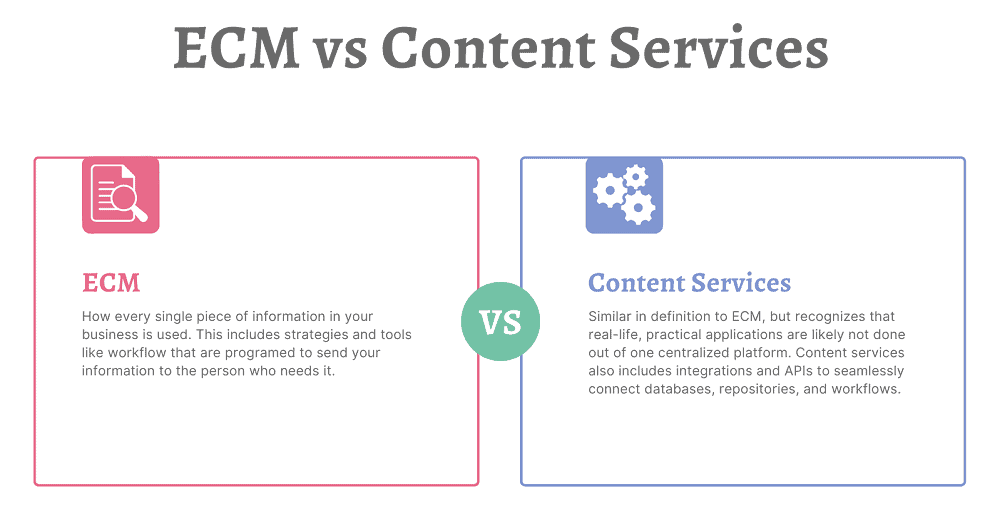
ECM was envisioned as a “closed” environment that would handle all information needs. Content services promotes openness and connectivity among multiple repositories and systems.

In practice, you’ll likely hear people use ECM and Content Services interchangeably. But for specific definitions:

Document management system (DMS) refers specifically to how you store and access your documents, along with monitoring the lifecycle of those documents.

Enterprise content management (ECM) is how every single piece of information in your business is used. This includes strategies and tools like workflow that are programed to send your information to the person who needs it.

Content services (CS) is very similar in definition to ECM, but recognizes that real-life, practical applications are likely not done out of one centralized platform. Content services also includes integrations and APIs to seamlessly connect databases, repositories, and workflows.

That being said, there are many platforms that aim to store, streamline, and automate your content that are also rich in integration opportunities. Those are called Content Services Platforms (CSPs).

What is a Content Services Platform?

According to Gartner, a content services platform is:

“a set of services and microservices, embodied as an integrated product suite and applications that share common APIs and repositories. A CSP exploits diverse content types and serves multiple constituencies and numerous use cases across an organization.”

small version of animated robot for rpaEssentially, a Content Services Platform is the next evolution of an enterprise content management system. It allows organizations to create, store, manage, and transfer information. A content services platform can include:
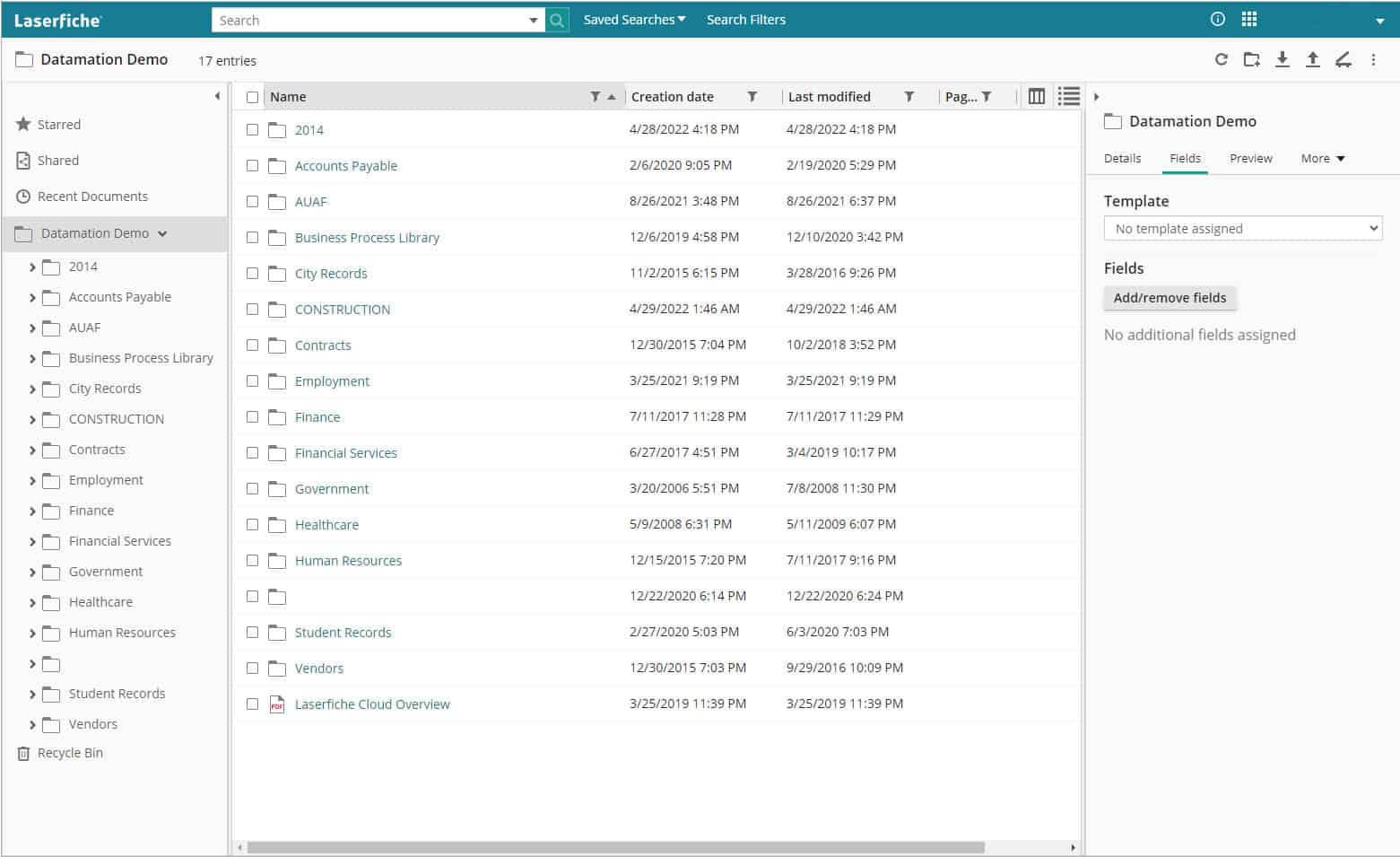
  • Electronic forms
  • Workflow automation
  • Robotic (RPA) and other intelligent process automation
  • Integrations with leading software (ERP, CRM, HRM, etc.)

Again, while CSPs are designed to be the main system of information management, they also feature the ability to be integrated into other software.

What Are the Different Elements of Content Services?

Content Services are broken into three main elements:

1. Content Services Platforms: the base platform that includes a content repository and acts as the main connector to other services. See above section for more details.

2. Content Services Applications: applications that provide business-focused solutions for functions like HR or IT. These can be separate or built into the content services platform. A good example is the Solution Marketplace for Laserfiche.

3. Content Services Components: components that provide a very specific function. This includes (but is not limited to) document imaging/data capture, electronic signatures, and language translation.

(click image to enlarge)

Why Do I Need a Content Services Platform?

One question that we hear a lot is: why do I need a content services platform when I can just store my files on our company servers or in general cloud storage?

The difference comes down to whether your files are living, active documents or just archival records.

If you’re storing archival records that rarely need to be accessed, then keeping them on your internal servers is a solution that will likely work well. As long as your network is secure, there shouldn’t be any problems with storing those records.

But companies that have lots of active, living documents that need to be accessed by multiple employees and/or departments can gain serious benefits by managing these files in a content services platform.

Benefits of a Content Services Platform

There are many benefits to investing in and using a content services platform.

Known Costs

Content services platforms will have upfront pricing based either on users or storage. There will be no surprises when your bill comes around and it’s easy to estimate costs if you need to scale up.

If you are using an online storage system (like Google Drive, OneDrive, Box, etc.), you can easily reach your free storage limit. We’ve had customers who reached that limit, but continued to upload documents, and were being billed without realizing it.

Records Retention

animated drawing of filing cabinetOften when it comes to records retention, companies just keep everything—just in case. But there’s no reason to. For example, most accounting-related information only needs to be kept for seven years (and depending on the document type, even less than that).

The problem with storing documents in a network folder is that you can’t assign searchable metadata to those files. So you either have to set up a very elaborate folder structure and hope that your employees stick to it, or manually search through the data to determine what can be deleted.

Content services platforms can automate all of this. Simply import documents, and the CSP can pull out relevant metadata (or you can add yourself), file the document in the correct folder, and tag it for a deletion report when it hits the end of its life. What may have taken hours or days manually will take minutes with a content services platform.

Standardized Filing

If you go into any organization, you will find that every employee names and files their documents a little differently.

With a content services platform, decision makers can determine a filing structure and then enforce it across the organization. Permission levels can be set to make it impossible for employees to change or modify the filing structure. This not only makes finding documents easier today but will make it easier for generations to come.

 Accessibility

A paper file can only be in one place at a time (unless there are multiple printed copies and that can cause other issues). An electronic file on a server can likely only be accessed at the office (or via a VPN). Content services platforms are designed specifically so your employees can access them from anywhere. The leading services are cloud-based so employees simply need to log into a portal from a browser.

One thing we hear a lot is that organizations don’t require a CSP because they store all their documents as PDFs in their ERP or CRM system. Not only does this not allow them to be widely searchable, but it can potentially make it harder for employees to access the documents they need if they are not in a centralized repository.

Security

data security privacy integrityDigital documents already have more security than paper ones, because people can’t just pick them up from a desk or pluck them from a filing cabinet.

But content services platforms take security even further. Administrators can assign special permissions to employees (either separately or as a group) so that they are only allowed to see the documents that they should and, if applicable, cannot delete anything from the repository. This means that only people processing invoices can see the Accounts Payable documents and only the highest level of Human Resources managers can see sensitive personal information.

These systems also feature document history and audit trails, so you know exactly who has opened and edited documents.

Additionally, CSPs feature some of the leading cybersecurity to keep your data safe and secure. Most also allow for two-factor authentication for organizations that want to add another layer of security.

Productivity and Time Savings

Being able to log into a document repository, make a search, and immediate find the information you need will allow your employees to work efficiently and service your customers (or students, or members, or whoever you need to provide information to) faster than ever before.

Additionally, process automation tools practically eliminate the time needed for basic tasks. When you’re working on paper, or even with digital documents, how long does it take you to get full and final approval? When you digitize and automate that process, you can reduce approval turnaround from days to minutes.

Ease of Use

Content services platforms are designed for anyone to use. Like all new software, there is a learning curve, but once you get the basics down, you can quickly find whatever information you’re looking for. Folders and projects are simple to add documents to, which is essential for your active, living files.

Most CSPs are built on folder or project structures, which means you can click down into the documents you need. Or you can do a text search and bring up all matching documents that you have access to.

CSPs are low- or no-code platforms, which means that advanced features like e-forms, workflow, and RPA (bots) are easy for people to setup without advanced coding knowledge.

Though for organizations with developers on staff, there is plenty of advanced functionality where you can design robust e-forms, workflows, and integrations. More about integrations in the next section.

Integrations

One of the most useful things about content services platforms is their ability to integrate with your other applications.

Think about the next time you hire an employee. With the click of a button, your HR management system can push information to your content services platform, which will in turn generate documents, inform relevant parties, email the onboarding forms, and kick off workflows for ordering equipment or creating user accounts on other systems.

Integrations are key for CSPs, and many of the leading platforms have native integrations with some of the leading accounting, HR, CRM, and ERP systems either right out of the box or easily added. There are also APIs and robotic process automation to connect the CSP to other disparate systems.

Now that we’ve covered some of the many benefits of a content services platform, let’s look at what you need to consider when selecting one for your business.

What Should I Consider When Shopping for a Content Services Platform?

There are a lot of CSPs, and each has their own strengths and weaknesses. However, you can find the right one for your business by doing some research.

animated checklist icon1. Determine which of your current systems are essential for business

As in, make a list of the software that you use and want to keep using for your organization. This includes ERPs, HR and/or accounting software, CRMs, and other custom applications built and used in your business (commonly referred to as line of business or LOB applications). You’ll want to have this list ready to see if your prospective content services platform features any direct integrations or easily added connector software.

Running older programs that don’t generally have APIs or integrations? Not to worry – depending on what you use the software for, RPA can likely log in and perform basic tasks (e.g. data scraping, copy/pasting).

2. Think about what functions your organization will use now and how you would like to grow

While having all of your documents digitized in one centralized location is a great start to digital transformation, the real power of content services platforms is how you collect and use data. Think about what information you collect via paper forms and your processes around them. It’s likely that all of that can be digitized, and a lot of it can be automated, but you’ll need to make sure that your CSP has that capability.

3. Partner with a consultant

Because there are so many different content services platforms, we recommend finding a trusted consultant or partner who can match your company and its needs with the right software.

We recommend this because consultants are intimately acquainted with the software and can answer your questions, offer realistic recommendations, provide best practice scenarios, and determine what integrations or workflows you will need. They also work closely with the software companies, so they will know about new features coming up in the product development. Additionally, they have access to demo accounts so you can try systems for free before you commit.

In full disclosure: Datamation is a content services consultant, and we would love to work with any company on their digital transformation journey!

4. Start your research

If you prefer to handle your project internally, then it’s time to do some research. Armed with your notes from steps one and two, it’s time to start diving into systems.

Start by going to software review websites to see how experts and customers rank their systems. Some great places to start are:

Remember: Enterprise content management systems and document management systems can also be content services platforms.

Pay extra attention to platforms listed as customers’ choice—these are ranked by actual users of the platform and not the website review team. It’s good to know how actual users feel because it doesn’t matter how cool a system looks, or how many features it boasts, if your employees don’t use it. It is not worth your investment.

Make a list of 5-10 content services platforms that you would like to research further and then go to their websites. The software websites will show you top features more in-depth and should have a listing of their integrations.

From there, you should be able to narrow down your list to 2-3 platforms. This is when you would request information from the sales team or setup a demo account. When you have demo accounts, make sure to use actual files from your organization so you can test how you and others would interact with the platform.

After gathering more information and/or trying the demo accounts, the right CSP for you should be obvious. But if you’re still unsure, consider looking for that right consultant or partner for more guidance!

There’s a lot to content services, so if you want to review a section, here are the quick links again:

Thinking about a new content services platform for your organization? We’d love to help you find the right one for your business. Contact us or give us a call at (630) 321-0601.

Questions or comments on this article? Find us on LinkedIn or Twitter.

6511

publish

2022-07-15 16:51:38

content-services

Top 3 Areas Driving Demand for Digital Files Due to COVID-19

When state governments enacted stay at home orders to slow the spread of COVID-19, the need for digital files skyrocketed. While many companies were already making a transition to paperless offices or had formal work from home policies, there some that were still relying heavily on paper.

As a document scanning and management company, we’ve seen a large interest in digitizing files in three areas: human resources, mailrooms, and microfilm records. These three departments are rapidly digitizing, no matter what the industry. This makes sense as all of these areas require timeliness, privacy, and accessibility for their records.

Let’s get into why these areas are seeing such a demand in digitizing.

1. Digitizing Human Resource Records and Processes

Human Resources is by far the most common area where businesses are scanning their records. We’ve spoken with industry peers across the country and they are also seeing a huge demand in human resources scanning.

And really, this makes a lot of sense. Human Resources is heavily dependent on paper and information. They require lots of processes and approvals for a variety of daily functions. When offices closed, they didn’t have access to their filing cabinets. But employees still needed to perform essential functions like hiring and onboarding. Having all existing and incoming personnel paperwork digitial enables the HR employee to work productively even while remote.

Here at Datamation we’ve seen a large increase in web traffic and calls about scanning HR files. Some are smaller companies that previously relied on paper-based processes. However, most are large companies with multiple offices that absolutely need virtual access and digital routing of personnel records. Without the ability to access their records virtually, HR employees are heading to the office to access records. Depending on the company, this can require management clearance, an exception to the remote work policy, and an office cleaning. Not to mention it can possibly compromise the employee’s health and safety.

2. Incoming Mailroom Processing and Scanning

Even if your employees aren’t in the office because of COVID-19, your mail is still heading there. As many companies don’t want to compromise the health of an employee, or need to make cuts due to the current recession, they’re looking to outsource their mailroom.

The process is simple: incoming is mail is picked up or routed to a scanning company (like us!) or sent to a P.O. Box managed by the third-party company. The company opens, scans, and indexes the mail by the intended recipient. After that, the digital images are uploaded to an FTP site so the company can download the images and process them accordingly, or a cloud-based document management system so each user can access their own mail independently.

Receiving your mail digitally enforces privacy. It also ensures quick document delivery to remote workers for prompt processing. Businesses need to receive about 50 pieces of mail per day to really see the benefit, but it’s simple to implement and cost-effective.

3. Scanning and Digitizing Microfilm and Microfiche

One of the most surprising things has been the increase in demand for microfilm scanning. While converting microfilm and microfiche to digital is one of our standard services, we’ve seen organizations of all sizes and industries reach out about digitizing this type of media.

This is because so many more people are working remotely and can’t access the microfilm and appropriate reader equipment at the office. For any company that was considering a conversion but wasn’t quite ready to make the investment, the pandemic reshuffled their priorities.

Records on microfilm and microfiche are generally archival in nature, so they don’t need to be accessed that often. But when they do (for example: when needing to check a 45-year-old life insurance policy or a 57-year-old student record), someone still has to go find the right piece of fiche or roll of film and then use antiquated equipment to find the right cell. Digitizing these records doesn’t just mean instant access at home—it also means that you never have to use a microfilm reader again.

Digitizing these records also increases their privacy. You can lock a digital file in a content management system with a password and/or user permissions so only those with the proper access can see it.

Finally, converting film and fiche to digital images means that the data will be around forever. Despite early claims that microfilm and microfiche could last for hundreds of years, much of it has started to degrade.

Other In-Demand Applications for Document Scanning

These three areas have seen a huge increase in digital files, but those aren’t the only places. Here are a few other applications for document imaging that we’ve worked on over the past few months:

  • Customer Service: With customer service employees working from home, they don’t have access to customer files in an office filing cabinet or on a server. Virtual access allows them to maintain a high level of customer service while working remotely.
  • Contracts: Storing contracts on a content management system allows for secure sharing. Proper approval parties can receive contracts via workflow. A system can keep all versions of this document without any kind of physical copy.
  • Tax Records: Sales tax, payroll tax, state tax, tax exemption and other large tax records frequently require office access to see these records. This is especially true in the event of an audit. Now employees and auditors alike can access these files remotely.
  • Legal Files: Virtual access to legal files provides fast access and more time for lawyers to perform billable services.
  • Accounting: Many companies are either outsourcing their accounts payable or using an in-house system where invoices can be digitized, and key data extracted so that their system can then automatically receive, route, and pay invoices.

The demand for digital files and these applications has increased this year. And it’s unlikely this will end when the COVID-19 pandemic does. Workplaces have been trending digital for the last few decades, and this was simply a push to accelerate the process. With fewer costs, more productivity, and less needed office space, there are so many benefits from having your records digitized and on a document management system.

If you need to digitize your files or a better way to access those files, we’re happy to help. Contact us or give us a call at (630) 321-0601.

Has your company adopted digital files for any of these departments or applications? What other trends have you noticed because of the pandemic? Find us on Twitter or LinkedIn.

6156

publish

2020-12-09 06:00:05

demand-digital-files-covid-19

The Benefits of Accounts Payable Automation

Even if you have your accounts payable processes down to a fine science, mistakes can still happen. That’s just the nature of mostly paper-based processes. And if you’ve ever found yourself wondering, “Did we pay that?” and unable to confirm that in less than a minute, then you should consider automating your AP processes. Eliminating mistakes and having immediate knowledge of your invoice status are just some of the benefits you can realize with accounts payable automation.

Read on for the rest of the benefits of automating your AP processes.

1. Significant Cost Savings

ap automation save costs on suppliesCost savings comes first because the savings are truly substantial. When you automate your accounts payable processes, you’ll see significant cost savings across the department.

Some examples are:

  • Less money spent on mailing invoices for approval
  • No costs to print or copy documents
  • Less money spent on office supplies
  • Free up your staff to work on other projects
  • Take advantage of early payment discounts

We’ve even heard from a client who had someone in their AP department retire, and because of how much was automated, they didn’t need to replace them. Not only did that save them in payroll, but also any costs associated with hiring and onboarding.

2. Eliminate Manual Data Entry Errors

No matter how skilled your AP employees are, there’s always the possibility of manual data entry error. We can’t help it! We’re human! But by automating your AP processes, you can eliminate costly data entry errors.

When you add documents to your software, the software automatically grabs important information and indexes it. An automatic workflow kicks off as soon as the invoice is confirmed and goes right to the designated approver. Once the process is over and everything is paid, your records are stored securely in your ERP and document management systems.

3. Better Vendor Relationships

ap automation better vendor relationshipsNo matter how great your vendors are, they’re going to get annoyed if you continually pay them late.

But when you implement AP automation, one of the benefits is that you can ensure that your vendors are paid on time, or early, every time. This will strengthen your relationship and that can lead to:

  • Early payment discounts
  • Product or service discounts
  • Industry insights you’re unaware of
  • Early access to new products or services
  • More customization to your specific needs
  • Referrals of your business to others

Once you get comfortable with your automated AP software, there are some that even allow for a vendor portal. Your vendors could log in and see the status of their invoices, which will eliminate many of the calls and emails.

If you don’t want to give vendors that kind of access, at least you’ll be able to give them the information quickly by just checking your system.

4. Immediate Approval Workflow

Ah, approvals. How much time in your day do you lose to chasing down approvals either in-person or by email?

One of the benefits of accounts payable automation is that you can create workflows that will immediately send off the invoice to an approver. And if the approver takes a while to approve? Follow up emails can be programmed to send with a reminder.

If you have multiple approvers, you can build the workflow to send to every single one. And if one of your approvers doesn’t approve the invoice? No problem. The workflow will send the document back to the AP department to handle whatever needs to be fixed.

Best of all, that entire document history is saved within your system, so you’ll know exactly who approved which invoice and when.

5. Easier 2-Way and 3-Way Matching

ap automation 2 3 way matchingWe don’t need to tell you why 2- and 3-way matching is important in accounts payable. What we can tell you is that automating makes this process much easier and take far less time.

You can do this by following these simple steps:

  • Add your documents to your document management software either by scanning paper or uploading PDFs
  • The system pulls the information from the documents (or you can manually enter it into index fields)
  • Do a simple search or run workflow to group the related documents together by the PO number

That’s it! Your days of getting up to pull documents from the filing cabinet and cross-referencing them by hand are over. The only time a human hand touches the invoice is if you scan it into your system.

This is also helpful if you have an audit – just pull up the related documents via a simple search! More on that later.

6. Quickly Identify and Solve Exception Processing

Another one of the benefits of accounts payable automation is that it will immediately identify invoices that don’t match the purchase order.

Once the invoice is brought into the system, based on rules you set up, it will try and match itself to the accompanying PO. Then you will be able to compare the documents and make sure that the amount matches.

If it doesn’t, you’ll have all the information right in front of you when you call the vendor to solve the error.

7. Stress-Free Accounts Payable Audits

Even though they’re important, nobody looks forward to an audit. Combing through files just to find a single document is time consuming for both the employees and the auditor.

With AP automation, audits take much less time and are far less stressful than keeping everything on paper. Here’s how:

  • Putting every invoice, purchase order, receipt, etc. into the system means that you can find any document you need with a simple search
  • Document audit trails show exactly when a document was added, who looked at it and when, who approved the invoice, and when it was marked paid
  • Auditors can spot discrepancies quickly via the dashboard or a search

It’s also highly likely that the last bullet point won’t even happen, but it’s better to know about a problem sooner rather than later.

With AP automation, audits are over in a snap and your department can get back to work.

8. Greater Visibility into Business Finances

When your invoices and purchase orders are all on paper, it’s hard to have a sense of what stage of approval or processing that every invoice is in. That also doesn’t make it easy to know how much money has been paid compared to how much still needs to be sent out.

But with a good AP Automation software, you’ll be able to have instant insight into the status of your invoices.

Some software features an impressive dashboard feature that lets you look at your invoices holistically and see their status, history, and accuracy. Software like Square 9 GlobalSearch lets you group invoices into specialized searches so you can see what’s outstanding and where it is in the approval and payment process.

As you can tell, automating your AP processes will truly give you some powerful benefits and take your department to the next level. With invoices handled quickly and completely when they come in, your employees will have the time to focus on higher level work.

Interested in learning more about how AP automation can help your business? Give us at call at (630) 321-0601 or contact us.

This post is part of the comprehensive Datamation Guide to AP Automation.

4558

publish

2019-09-12 06:00:07

benefits-accounts-payable-automation

Why Manual Data Entry Causes Problems (and What You Can Do!)

No matter the situation, no matter the employee, no matter the time, any situation that involves manual data entry is going to be subject to error. And it’s not necessarily someone’s fault—there are lots of things that can happen to make your data entry just a little less than perfect.

Here are some of the problems that can be caused with manual data entry:

1. Human Error

The first on our list is perhaps the most obvious. No matter how great of an employee you have, there will be mistakes—it happens to everyone. People can have an off day, they may have their fingers on the wrong keys, or they could have a workplace distraction. Now multiply that by however many people you have doing data entry.

2. Expense

Not only do you have the expense of an employee’s salary, but also their workstation, computer, and any time taken to train them. On top of that, if the training is inadequate, employees will not perform at their best.

With any manual task, data entry by hand takes up a lot of time. Employees have to look at the file or record to enter, enter the data, and then double check their work. While these aren’t many steps, this does take a lot of time to perform and just as much to check.

Worst case scenario, these errors can cost your organization millions.

3. Missing Items

With manual data entry, the employee usually will be handling paper invoices, bills, and other important documents. With the documents being delivered, sorted, used, and filed, it’s not uncommon for something to go missing. If the wrong file goes missing, it can lead to financial penalties and strained relationships with clients and suppliers. It can also lead to our next problem.

4. Inaccurate Data

When data is entered incorrectly, it can lead to all sorts of problems. You may have wrong account numbers, prices, or information. And if you rely on this kind of information to make big decisions, you could be making the wrong ones.

data entry problems

So what can you do about it?

If you want to stick with manual data entry, make sure that you invest the time in proper training and build in some quality control checks to ensure that your employees are giving the best output.

But another choice, especially when it comes to accounts payable, is to invest in an automated AP system. An automated AP system not only cuts down on expenses and human error, but you can also:

  • Use AP processing data to forecast cash flow
  • Form better cash management plans
  • Increase visibility into invoice processing
  • Build up relationships with suppliers

When it comes to suppliers, you can even incorporate a portal for them. This gives them the ability to get a better idea of where they stand with payment, deliveries, and other information. Also having that open line of communication between suppliers and other departments makes almost every process and function much smoother and less prone to error.

Finally, sometimes suppliers give businesses an early payment discount. With your system streamlined and costs cut back, you can take advantage of these savings which will save your business even more!

Interested in learning more about what automated AP can do for your business? Contact Datamation or give us a call at (630) 321-0601 today.

This post is part of the comprehensive Datamation Guide to AP Automation.

1676

publish

2019-02-12 00:00:00

why-manual-data-entry-causes-problems

Greater Efficiency in Human Resources Leads to Greater ROI

This post is part of The Datamation Guide to Human Resources Records.

In any industry, time is money. Usually, the longer something takes to do, the more it costs, and that includes any kind of Human Resources process within your business. Paper documents are outdated, inconvenient, cumbersome, and most importantly, they reduce your company’s efficiency. And with less efficiency comes a lower return on investment Datamation can provide your company with the tools it needs to implement a solid workflow that will save time, money, and effort while increasing your ROI!

In HR processes like onboarding, training, or payroll, the amount of information that must be shared between departments (originating with yours) is huge. With each employee having several types of documentation filed away, thousands of papers cross HR department desks each week.

The problem with paper is that it can’t be effectively processed in such large amounts. It takes a huge amount of time to find the paper document, pass it from approver to approver, and to finally refile it. The longer it takes to process information, the more money it costs your company.

The only way to drastically reduce processing time is to scan your documents into an automated workflow, eliminating the need to pass along each record or file by hand. This keeps documents from getting misplaced, and also gets them through layers of approval quickly and efficiently.

On average, an employee spends 19.8% of business time trying to find a certain paper document, adding up to about one full day a week. Think about how much more would get done if it took just a few seconds to find a document, and how much of that time could be directed towards targeting problem areas of your company. When you scan your files and store them electronically, any document can be found within just a few seconds with a simple keyword search. The ability to find documents quicker leads to quicker processes in general, which in turn vastly improves customer service. Your company’s time is valuable—make sure it is used wisely.

With the amount of information that crosses your desk on a daily basis, you don’t have time to search for documents that have gone missing or that are stored among thousands of other documents in a filing cabinet. The more time it takes to complete one of your many tasks, the more money your company is spending to keep those processes going. Integrating your documents into an electronic workflow with Datamation will make your company’s processes more efficient, more timely, and less cumbersome.

Call (630) 321-0601 today to discuss the perfect plan for your business.

1754

publish

2018-04-20 00:00:00

greater-efficiency-leads-to-greater-roi

Use an Automated Workflow to Leverage Your Financial Data

This post is part of The Datamation Guide to Human Resources Records.

Having total visibility into your company’s financial data is vital to future decision making and effective allocation of resources. Working with paper records that contain this information makes it incredibly difficult to gather and analyze the data that you need to make better choices. Scanning your financial documents and creating a workflow gives your company full visibility into every aspect of your finances, giving you the tools you need to make the best decisions for your business.

The process can be broken down into two steps.

Step One: Quantity Your Data

The first step to leveraging financial data is to quantify it. Having the right data on the number of employees, salaries, recent raises, turnover rates and comparisons, employee performance, and resource allocation can be extremely helpful in making important financial decisions. The difficult part of this is working with paper copies of all of these data sets is that gathering, compiling, and forming reports from hundreds of different paper sources takes time and often wasted effort.

With Datamation, those numbers and that original data can be quickly and accurately compiled into a clear report that can be faxed, printed, and distributed widely. There is no longer any need to spend hours or days searching through piles of documents to gather data, read it all, and make it into a comprehensive report—everything can be generated automatically and can be used immediately.

Step Two: Put Your Data to Use

After that data is gathered, its time to put it to use. Salary and performance data can be used to track talent within the company, or financial data can be mapped out to see where valuable resources are going, and much of this data combined can be used to assess your business’ general well-being and performance. From this data, your company can make well-informed decisions that are backed up by hard numbers.

It is becoming increasingly important for both employees and employers to have visibility into many of the company processes to measure both personal and company-wide progress. The generated data is helpful in looking at the company’s performance as a whole, its performance in specific departments, or both.

Wrapping It Up

Having accurate, comprehensive data for your company’s performance allows more confident decision making that is based on hard data. It also allows you to target areas that visibly need more work, or employees who may be performing well without being noticed.

Using paper documents, compiling all of the this data for your company would be difficult and time consuming. Datamation allows you to access all of your documents in just a few seconds, and can automatically generate the reports you need for your company to perform its very best.

Call Datamation today for a quote!

1755

publish

2018-04-20 00:00:00

leverage-your-financial-data

Automated AP Processing Can Save Your District Money

This post is part of The Datamation Guide to Managing School District Records.

While most industries face issues with manual accounts payable processing, schools simply don’t have the funds to waste on the extra costs that come with manual data entry and processing. Manual processing is costly, error-prone, and time-consuming between approval, matching, data entry, and more. Manual processing is outdated, and luckily, unnecessary when you automate your AP processes with Datamation.

The average invoice costs $22.75 and 16.3 days to process—and that’s just a single invoice. Between cafeteria food vendors, equipment vendors, and more, the average school district handles hundreds of invoices per year.

The amount of resources that go into AP processing reaches beyond money—employees who enter this data could be spending their time enriching student experience. Besides being a waste of valuable resources, manual entry is subject to a sizable margin of human error. When employees spend hours reading and entering numbers, it’s probable that tired eyes will lead to mistakes, which are costly and time intensive to fix.

When AP processing is automated, the difference is dramatic in the amount of time and money saved. Automated invoices cost $3.40 and 6.1 days on average to process. Every step of the process is automated, and the costs of printing, mailing, matching, and fixing data entry mistakes are eliminated.

In addition, companies who automated their AP processes were able to take full advantage of prompt pay discounts, which are offered to businesses who pay their invoices early or on time. On average, only 16% of districts and businesses who don’t automate are able to take advantage of prompt pay discounts. Comparatively, 47% of districts or businesses who do automate are able to use these discounts.

Better still, the money saved by automation can be put towards better equipment, more educational programs, and funding for clubs or teams. Without having to spend time entering data, staff productivity will increase and be directed towards school-wide improvement.

Datamation can take AP processing from an inefficient, time-consuming chore to a streamlined, nearly effortless workflow. The changes made to this process have widespread benefits: higher employee productivity, huge savings, fewer errors, and more funding for the important things within your district.

Datamation can make a world of difference in how your district runs, and gives you only the best results for the well-being of your students and employees.

1708

publish

2018-03-14 00:00:00

automated-ap-processing-can-save-your-district-money