
Do You Know Who Has Accessed Sensitive Information?

This post is part of The Datamation Guide to Human Resources Records.

In any position within an HR department, all employees are bound to work with extremely personal documents at one point or another. Medical records, performance evaluations, payroll information, emergency contact information, and home addresses are just a few examples, all containing information that if leaked, could easily be used for exploitation. Paper documents and records in filing cabinets simply dont provide the level of security needed for these vital records. Only scanning and storing those files digitally with Datamation can provide your company with the security it needs to protect your employees.

(more…)

Create the Perfect Solution with Human Resources Workflow

This post is part of The Datamation Guide to Human Resources Records.

If your company is currently working with paper documents and records, what does your workflow look like? Do you have one? With the increasing amount of paperwork needed to maintain compliance and industry standards, managing all of this paper is getting more and more difficult for HR departments everywhere. Datamation has provided businesses everywhere with the perfect workflow solution by capturing the data on all documents and records and placing it directly into an efficient, airtight workflow.

Automated HR Workflows can automate several processes that would normally take a huge amount of time and effort, including:

● Onboarding

● Performance reviews

● Payroll

● Applicant hiring and screening

● Employee training

● Travel and leave requests

These are just a few of the regular HR processes that can be integrated into a workflow. Using the data captured from paper documents or E-forms, all of the information that would normally have to be manually processed from a paper record can be sent to the right department at the right time, seamlessly.

One of the most important factors in HR processes is that any procedures that are carried out must be uniform. In a disciplinary situation, for example, in order to prevent any kind of dispute over how it was handled, it is vital that each employee involved is treated in the exact same way. If everything is handled in the same way, there is no room for dispute or even litigation. Having a consistent workflow ensures that everything is uniformly carried out.

Disciplinary actions are just one of the many processes that require consistency. The more uniform each and every task is, the better your company’s overall organization. Both document scanning and the use of E-forms can make this a reality for your company, and Datamation can easily provide you with a solution that fits your needs exactly—no need to spend money on things that don’t apply to your specific business.

Datamation provides a wide range of software that uses OCR (Optical Character Recognition) to capture the data needed to effectively perform within the workflow. Call Datamation today to discuss a plan that works for you.

1748

publish

2018-04-20 00:00:00

create-the-perfect-solution-with-hr-workflow

Did You Get That Done? You Can with Automated Workflows

This post is part of The Datamation Guide to Human Resources Records.

As regulations become more stringent and as paperwork per employee increases, it becomes more and more difficult to properly process and manage those documents. As your company grows, your HR department can’t afford to let paperwork intensive tasks slip through the cracks, leaving your company open to fines and litigation. Datamation can provide your company with a comprehensive, automated workflow that fits your company’s specific needs and wishes to ensure that you get every single task done, every time.

Take employee onboarding, for example. Whether the person is a rehire or a brand new employee, there is extensive paperwork involved. A few documents that are necessary with any hire are W-4s, I-9s, direct deposit information, benefits packages, offer letters, job descriptions, emergency contact information, and an employee handbook—and this doesn’t even include everything! Making these documents electronic, including E-forms, allows employees to directly fill out their information electronically, eliminating the need for paper processing and reducing the error that comes with manual processing, and allowing these documents to be placed directly into your workflow. You’ll never have to deal with missing or incomplete paperwork again.

Automated workflows are also perfect for situations like disciplinary actions, training, or any kind of procedure. Having a uniform workflow and system for completing and filing the paperwork ensures that firstly, no steps of the process are missed and secondly, that all situations are treated exactly equally, preventing dispute. Along the same line, having a set process for maintaining compliance and keeping up with regulations can be crucial for your company. Having an automated workflow with E-forms makes it easy for your department to electronically update paperwork based on changing regulations, ensuring that your company is always up to date. Leaving it up to chance, or manually updating and processing regulation documents can subject your company to unnecessary fines.

Automated workflows make your company’s HR processes easier as a whole. All documents can be kept in one secure system that still provides easy and quick access. It ensures that nothing is missed, from employee onboarding to training procedures and compliance, providing uniform, consistent procedures. With everything conveniently in one system, you never have to wonder if that one nagging task got done again. Call Datamation today to make the perfect plan for your company!

1752

publish

2018-04-20 00:00:00

did-you-get-that-done

Greater Efficiency in Human Resources Leads to Greater ROI

This post is part of The Datamation Guide to Human Resources Records.

In any industry, time is money. Usually, the longer something takes to do, the more it costs, and that includes any kind of Human Resources process within your business. Paper documents are outdated, inconvenient, cumbersome, and most importantly, they reduce your company’s efficiency. And with less efficiency comes a lower return on investment Datamation can provide your company with the tools it needs to implement a solid workflow that will save time, money, and effort while increasing your ROI!

In HR processes like onboarding, training, or payroll, the amount of information that must be shared between departments (originating with yours) is huge. With each employee having several types of documentation filed away, thousands of papers cross HR department desks each week.

The problem with paper is that it can’t be effectively processed in such large amounts. It takes a huge amount of time to find the paper document, pass it from approver to approver, and to finally refile it. The longer it takes to process information, the more money it costs your company.

The only way to drastically reduce processing time is to scan your documents into an automated workflow, eliminating the need to pass along each record or file by hand. This keeps documents from getting misplaced, and also gets them through layers of approval quickly and efficiently.

On average, an employee spends 19.8% of business time trying to find a certain paper document, adding up to about one full day a week. Think about how much more would get done if it took just a few seconds to find a document, and how much of that time could be directed towards targeting problem areas of your company. When you scan your files and store them electronically, any document can be found within just a few seconds with a simple keyword search. The ability to find documents quicker leads to quicker processes in general, which in turn vastly improves customer service. Your company’s time is valuable—make sure it is used wisely.

With the amount of information that crosses your desk on a daily basis, you don’t have time to search for documents that have gone missing or that are stored among thousands of other documents in a filing cabinet. The more time it takes to complete one of your many tasks, the more money your company is spending to keep those processes going. Integrating your documents into an electronic workflow with Datamation will make your company’s processes more efficient, more timely, and less cumbersome.

Call (630) 321-0601 today to discuss the perfect plan for your business.

1754

publish

2018-04-20 00:00:00

greater-efficiency-leads-to-greater-roi

Use an Automated Workflow to Leverage Your Financial Data

This post is part of The Datamation Guide to Human Resources Records.

Having total visibility into your company’s financial data is vital to future decision making and effective allocation of resources. Working with paper records that contain this information makes it incredibly difficult to gather and analyze the data that you need to make better choices. Scanning your financial documents and creating a workflow gives your company full visibility into every aspect of your finances, giving you the tools you need to make the best decisions for your business.

The process can be broken down into two steps.

Step One: Quantity Your Data

The first step to leveraging financial data is to quantify it. Having the right data on the number of employees, salaries, recent raises, turnover rates and comparisons, employee performance, and resource allocation can be extremely helpful in making important financial decisions. The difficult part of this is working with paper copies of all of these data sets is that gathering, compiling, and forming reports from hundreds of different paper sources takes time and often wasted effort.

With Datamation, those numbers and that original data can be quickly and accurately compiled into a clear report that can be faxed, printed, and distributed widely. There is no longer any need to spend hours or days searching through piles of documents to gather data, read it all, and make it into a comprehensive report—everything can be generated automatically and can be used immediately.

Step Two: Put Your Data to Use

After that data is gathered, its time to put it to use. Salary and performance data can be used to track talent within the company, or financial data can be mapped out to see where valuable resources are going, and much of this data combined can be used to assess your business’ general well-being and performance. From this data, your company can make well-informed decisions that are backed up by hard numbers.

It is becoming increasingly important for both employees and employers to have visibility into many of the company processes to measure both personal and company-wide progress. The generated data is helpful in looking at the company’s performance as a whole, its performance in specific departments, or both.

Wrapping It Up

Having accurate, comprehensive data for your company’s performance allows more confident decision making that is based on hard data. It also allows you to target areas that visibly need more work, or employees who may be performing well without being noticed.

Using paper documents, compiling all of the this data for your company would be difficult and time consuming. Datamation allows you to access all of your documents in just a few seconds, and can automatically generate the reports you need for your company to perform its very best.

Call Datamation today for a quote!

1755

publish

2018-04-20 00:00:00

leverage-your-financial-data

Tap Into the Talent In Your Company

This post is part of The Datamation Guide to Human Resources Records.

Your employees are the main moving parts within the company. Their performance as individual contributors forms the performance of the entire company, so having a uniform, organized system to measure individual performance is vital to track talent within your company. Without an organized system, keeping track of employee performance effectively is next to impossible.

Datamation can give your company the comprehensive system that it needs to compile data on performance and integrate them into effective reports automatically.

Consistently keeping track of employee performance not only benefits the employee, but the company, as well. If there is an employee that is a consistent high performer, that employee deserves recognition, and perhaps a pay raise. Having that data also allows your company to track that high-performing employee and utilize their value and their skills to the full extent.

On the other hand, a comprehensive evaluation may lead to the discovery that another employee is underperforming. In either situation, having complete visibility into employee performance is vital in making sure that your company is performing at the very best rate that it can while rewarding and encouraging high performance.

The other necessary function of employee evaluation is to revisit job descriptions to map out goals and expectations. Evaluations don’t only monitor performance, but they also serve to check in with management to discuss the guidelines for future performance and expectations. It’s also possible that the employees role has changed within the company, requiring the expectations and goals to be shifted. When expectations and goals are laid out and explained right away, you avoid awkward surprises and further miscommunication down the line.

You can make this part of the process easier as well by allowing standards and guidelines to be updated as the company grows and changes. E-forms, or electric forms, eliminate the need for paper forms altogether, making document changes happen with just a few clicks.

Are your employees performing to their best abilities? Have you been able to notice and monitor who is working diligently, and who isn’t? It can be difficult to keep an eye on every employee without accurate and thorough reports in addition to a consistent, uniform process of evaluation.

With automated workflows, digital document storage and access, and a system that moves and grows with your company, Datamation provides the best solution customized especially to your needs and wants. Recognize, reward, and leverage the talent within your company to boost your company’s performance as a whole by focusing on the parts.

1756

publish

2018-04-20 00:00:00

tap-into-the-talent-in-your-company

The Most Secure Solution for Your Sensitive Information

This post is part of The Datamation Guide to Human Resources Records.

Human Resources departments are regularly bombarded with thousands of sheets of paper every day. What happens with this paper once it crosses your desk? Maybe it’s filed away into a box or a filing cabinet in the office. But the problem is that even with a locked filing cabinet, there is absolutely no guarantee that paper documents will be safe. Though this spells trouble for any department, HR departments are particularly vulnerable because of all of the sensitive documents that must be kept on file. Allowing those documents to fall into the wrong hands leaves your company and your employees extremely vulnerable.

The information that HR departments deal with every day may include medical records, performance evaluations, payroll information, emergency contact information with home addresses, financial information, and even social security numbers. All of this information is extremely personal, and if leaked, it would be devastating to both the employee and the company. With so much at risk, it is imperative that your company takes every measure it can to keep those documents safe.

Datamation can provide your company with the security it needs, creating the perfect customized solution for your business. It all begins with scanning all of your paper documents, which can be done with the paper documents that you already have, or documents can be scanned as they come in. This way, they become immediately accessible and much more secure than they were in paper form.

One of the most secure ways to store and access information is through ImageSilo, an entirely cloud-based storage system. Because everything is stored in the cloud, all of those records don’t take up any physical space. Better still, ImageSilo protects all of your documents using five layers of password protected security. This means that only those with explicit access and specific passwords can access the information. Records can also be accessed at any time, anywhere there is internet access. The best part of ImageSilo is that administration can also see who has accessed information, and when.

Keeping all of those extremely sensitive documents in paper form is simply not good enough when it comes to protecting your company and your employees. Locks don’t always keep intruders out, but five layers of security and password protection will. Don’t leave the security of sensitive employee information to chance—call Datamation today to discuss the perfect solution for your business.

1749

publish

2018-04-20 00:00:00

the-most-secure-solution-for-your-sensitive-information

Protect Your Human Resources Files

This post is part of The Datamation Guide to Human Resources Records.

Human Resources departments in any industry serve as the touch point for the entire company. As the department that handles sensitive and personal documents every day, it is vital that these documents are kept secure at all times. While most processes are made harder when paper documents are being used, keeping paper records secure is particularly difficult.

How safe can your filing cabinets really be? Even when they’re locked, not very. Not only can they be broken into, or simply left unlocked, but they are also vulnerable to fire and flood damage. Paper documents are just inherently insecure, no matter how they are stored.

Besides being unsafe during storage, paper documents are liable to get lost during processing, or even in the mail. It’s so easy for anyone to accidentally leave a sheet of paper on a desk, where before anyone knows it, it is buried underneath more paper. With the security of your employees on the line, this is unacceptable.

So what do you do to ensure your file security?

Datamation has the perfect security solution for any business in any industry. One of the most secure options for your documents is ImageSilo, an entirely cloud-based storage system. ImageSilo provides five layers of encrypted security, only giving those with specific passwords access to sensitive documents. At the same time, documents can be found quickly with a simple keyword search, eliminating the need to spend valuable time finding that one document that you need. Another great feature of ImageSilo is that administration can track who saw a sensitive document, and when, giving your company full visibility if anything ever comes into question.

Scanned and digitally stored documents can also be placed into a comprehensive workflow that makes all of your business’ processes uniform, an especially important factor in an HR department. Having uniform procedures for disciplinary measures, training, onboarding, and more ensures the consistent treatment of employees, leaving little room for dispute. It also saves employees the pain of manually entering data, saving your company time and money in turn. Better still, because paper documents aren’t being mailed and passed around, they are less likely to get lost in the everyday processes of an HR department.

Scanning your documents with Datamation protects your sensitive documents in more than one way. They are protected by five layers of security from unauthorized viewing, and they are protected from getting lost or damaged by fire and flood. And at the same time, as long as you’re an authorized user, accessing those documents has never been easier! Never again will your employees spend hours per week searching through filing cabinets for that one folder or sheet of paper that they need—documents can be found with a few clicks and a keyword search.

Call Datamation today at (630) 321-0601 to make life in the HR department a little bit easier.

1750

publish

2018-04-20 00:00:00

protect-your-hr-files

Scanning Documents = Saving Space = Saving Costs

This post is part of the comprehensive Datamation Guide to Office Relocation.

Moving your business to a new location is exciting, but daunting. With the costs of moving trucks, movers, and more, it can really add up, so its important to cut costs when you can.

One of the biggest costs that you encounter may be moving your heavy, bulky filing cabinets that take up a huge amount of space in moving trucks. Scanning your documents before you move can eliminate the costs and inconvenience of transporting your files, and has long term benefits that cant be matched.

If you plan to scan your documents well ahead of moving, you could save big on renting or leasing your new office space. Think of how many filing cabinets or boxes of documents that are in your office right now, and then imagine how much space you would have if you got rid of them.

Has your company been thinking about moving to a larger location? Well you may not have to if you scanned your documents and store them digitally. Since rental and lease costs increase as the amount of space increases, you’ll save money with a smaller space.

Fewer filing cabinets and boxes may also mean fewer moving trucks or movers, which means fewer costs to your company. To demonstrate where you can save by scanning documents, here are some stats about the average office relocation:
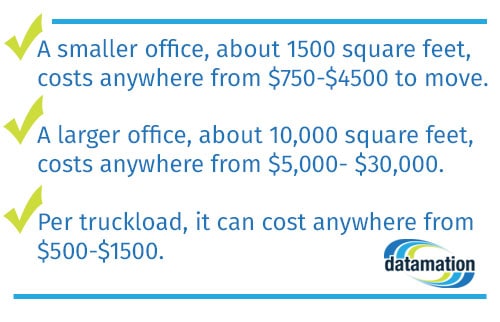
the cost for moving offices

So to recap:

● A smaller office, about 1500 square feet, costs anywhere from $750-$4500 to move, depending on how much needs to be moved.

● A larger office, about 10,000 square feet, costs anywhere from $5,000- $30,000 if there are many employees, workstations, or filing cabinets.

● Per truckload, it can cost anywhere from $500-$1500 depending on how much time it takes to load the truck, how hard it is to load the truck, and the number of movers.

Essentially, the fewer boxes and cabinets you have, the more money you save on labor and space. The money that you save on moving pays for the process of document scanning and management, and has extensive long-term benefits as well.

Scanning your documents keeps your files safe, easily accessible, and organized without taking up any physical space. In an electronic format, documents are safe from fires and floods and also have layers of security that can only be accessed with specific passwords.

That being said, even with this much security, these documents can be accessed within a few seconds by authorized staff, eliminating the need to dig through filing cabinets. Better still, if you need to access a document during the move, you can! Moving offices doesn’t have to disrupt your entire workflow.

Moving offices can be troublesome and expensive, but if you scan your documents before you move, the scanning process pays for itself. With less space taken up by cumbersome filing cabinets and less heavy lifting to do for movers, your business will save big on moving costs, and you’ll reap the benefits of document scanning for years to come.

1734

publish

2018-03-27 00:00:00

saving-space-saving-costs
Moving Offices: A Chore Or An Opportunity? 

Moving to a different office takes extensive planning, preparation, and cost. In addition to moving your employees, their belongings, furniture, and more, you also have to figure out how to move the filing cabinets and boxes housing your records and documents. And that doesn’t even include needing to reorganize them in your new office, too. This sounds like a huge undertaking, but it doesn’t have to be. Look at moving as less of a chore, and more of an opportunity to scan all of your files before you move.

Check out the benefits to scanning your files before you move.

Benefit One: Fewer Things to Move

scanning saves money on storage costsThe first benefit that you’ll see when you scan your documents is that you don’t have to haul heavy and bulky filing cabinets and boxes to your new office location. This means that you’ll spend less money on movers and moving trucks, and you’ll have more space to transport other things from your old office. While this is obviously a huge short-term benefit, it is far outweighed by the long-term benefits of document scanning.

Benefit Two: Opportunity to Create or Redo Workflow

Scanning all of your documents allows your company to completely revamp your workflow. Rather than having to manually process invoices, Datamation offers services that can receive, match, and send your invoices for approval to be paid automatically. This frees your employees up from spending hours manually entering and matching data, and is also the closest to error-free processing that you can get. Now, you can pay all of your bills on time and take full advantage of those prompt pay discounts.

Benefit Three: Lower Storage-Related Costs

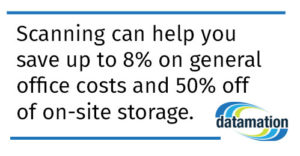
Document scanning can also lower costs on storage, and possibly on rent. Think of how many filing cabinets your office has, and how much space they take up. If you scan your documents well before you move, you may be able to obtain a smaller office, which means that you could potentially save money on renting and leasing that space. Even if you don’t move to a smaller space, scanning can help you save up to 8% on general office costs and 50% off of on-site storage.

Benefit Four: Your Information is More Accessible

Finally, scanning all of your files can make them easily accessible. Rather than spending hours trying to find one document, you can pull one up with just a few clicks using a keyword search. This also ensures that if a document is needed during the move, it can be accessed—something that would be practically impossible with paper documents.

Rather than worrying about the logistics of moving to a new office, look at it as an opportunity to change how your company runs completely. Yes, scanning your documents eliminates the need to haul them along when you move, but it also gives your company a brand new workflow and files that are accessible whenever and wherever they are needed.

This post is part of the Datamation Guide to Office Relocation.

1724

publish

2018-03-27 00:00:00

moving-offices-a-chore-or-an-opportunity